Fact-checked by the VisualeNews editorial team
Quick Answer
SSDs are faster, more durable, and energy-efficient, while HDDs offer more storage per dollar. As of July 2025, a 1TB SSD costs roughly $60–$80, versus $20–$30 for a 1TB HDD. For most users, an SSD is the better everyday choice. HDDs remain ideal for bulk backup storage where speed is not a priority.
The SSD vs HDD comparison comes down to one core tradeoff: speed and reliability versus cost per gigabyte. Solid state drives use NAND flash memory with no moving parts, while hard disk drives rely on spinning magnetic platters — a design dating to 1956. According to Statista’s global PC storage shipment data, SSDs now outsell HDDs in consumer laptops by a significant margin, reflecting a clear market shift toward faster storage.
Choosing the wrong storage type costs you in performance, money, or both. This guide breaks down the full SSD vs HDD comparison — covering speed, price, lifespan, power use, and which option makes financial sense for your specific situation.
Key Takeaways
- SSDs are dramatically faster: a typical NVMe SSD reaches sequential read speeds of 3,500 MB/s, compared to 80–160 MB/s for a traditional HDD (Tom’s Hardware SSD Hierarchy).
- HDDs still offer the lowest cost per gigabyte — roughly $0.02–$0.03 per GB versus $0.06–$0.08 per GB for SSDs as of mid-2025 (StorageReview pricing analysis).
- SSDs consume significantly less power: a typical 2.5-inch SSD draws 2–3 watts under load, while a 7,200 RPM HDD draws 6–10 watts (AnandTech endurance testing).
- HDD failure rates average 1.4% annually according to Backblaze’s 2024 Hard Drive Stats, while SSD failure rates run lower, though both degrade over time.
- A laptop upgrade from HDD to SSD typically reduces boot time from 45–60 seconds to under 15 seconds, a measurable productivity gain (PCMag upgrade guide).
In This Guide
- What Is the Core Difference Between SSDs and HDDs?
- How Do SSDs and HDDs Compare on Speed?
- Which Is More Affordable: SSD or HDD?
- Which Drive Type Lasts Longer and Fails Less?
- Which Storage Type Is Right for Your Specific Use Case?
- How Do SSDs and HDDs Stack Up Side by Side?
- Should You Upgrade From HDD to SSD Right Now?
What Is the Core Difference Between SSDs and HDDs?
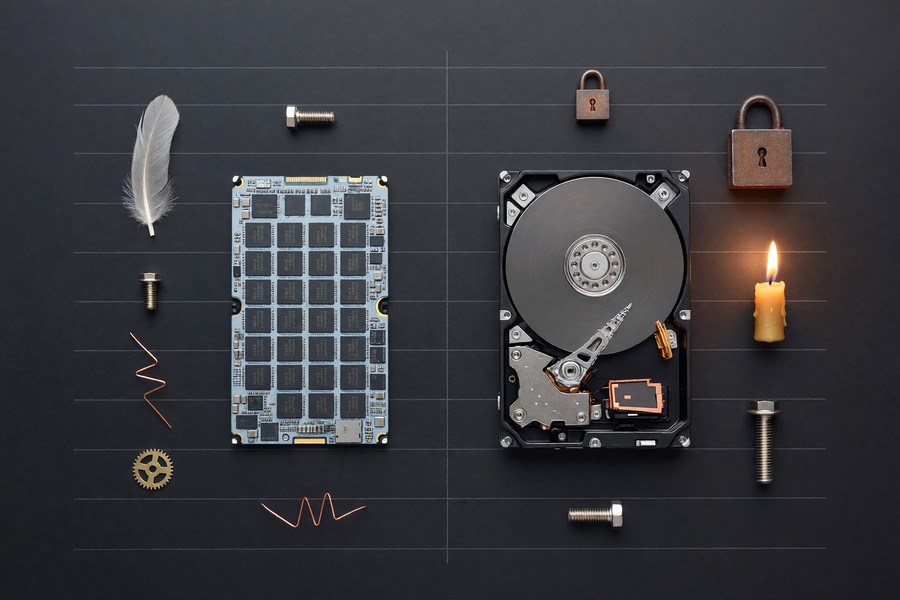
The fundamental difference is physical: SSDs store data on interconnected flash memory chips, while HDDs use a spinning magnetic platter read by a mechanical arm. This architectural gap drives every other performance difference in the SSD vs HDD comparison.
Because SSDs have no moving parts, they access any data location instantaneously. HDDs must physically move a read/write head to the correct track, introducing latency measured in milliseconds.
How Each Drive Stores Data
NAND flash memory in SSDs stores data as electrical charges in cells. Modern SSDs use TLC (triple-level cell) or QLC (quad-level cell) flash, balancing cost and endurance. Leading manufacturers including Samsung, Western Digital, Seagate, and Micron produce both drive types.
HDDs encode data magnetically on aluminum or glass platters spinning at 5,400 to 7,200 RPM. The mechanical nature makes them vulnerable to shock, vibration, and wear over time. A dropped laptop with an HDD mid-write is far more likely to suffer data loss than one with an SSD.
The first commercial hard disk drive, IBM’s 350 RAMAC, stored just 5 megabytes and weighed over 900 kilograms. A modern SSD the size of a postage stamp stores up to 4 terabytes.
How Do SSDs and HDDs Compare on Speed?
SSDs are categorically faster than HDDs in every measurable speed metric. This speed gap is the single biggest reason the SSD vs HDD comparison tips decisively toward SSDs for everyday computing tasks.
A standard SATA SSD delivers sequential read speeds of 500–550 MB/s. An NVMe SSD using the PCIe 4.0 interface reaches 3,500–7,000 MB/s. By contrast, a 7,200 RPM HDD tops out around 150–200 MB/s sequential — and much slower on random reads, which dominate real-world use.
Real-World Speed Impact
Boot times, application launch speeds, and file transfer rates are all affected. According to Tom’s Hardware’s SSD benchmark hierarchy, a mid-range NVMe drive opens applications in a fraction of the time a mechanical drive requires. For video editors, developers, or anyone working with large files, this is not a marginal gain — it is a workflow transformation.
Random 4K read/write performance matters most for operating system tasks. SSDs achieve 50,000–100,000 IOPS (input/output operations per second), while HDDs typically manage 100–200 IOPS. That is a difference of up to 500 times faster on the operations your system performs constantly.
NVMe SSDs are up to 35x faster than traditional 7,200 RPM hard drives in sequential read performance — and up to 500x faster in random read operations that govern everyday system responsiveness.
Which Is More Affordable: SSD or HDD?
HDDs are cheaper per gigabyte, but the price gap has narrowed dramatically. For storage-intensive applications — such as NAS backup arrays or surveillance systems — HDDs still offer a compelling cost advantage in the SSD vs HDD comparison.
As of July 2025, a 1TB SATA SSD retails for approximately $60–$80, while a comparable 1TB HDD costs $20–$30. Scale that to 8TB and the difference becomes significant: an 8TB HDD runs around $130–$160, while an 8TB SSD can exceed $600.
Total Cost of Ownership
Purchase price is not the whole story. SSDs consume less power, which matters over years of use. A desktop workstation running an SSD instead of an HDD can save $5–$15 per year in electricity costs — modest, but real. Just as tracking hidden digital costs like forgotten subscriptions adds up, small recurring savings on energy compound over time.
SSDs also reduce the risk of costly data loss from mechanical failure. Replacing a failed drive and recovering data can cost $300–$1,500 at a professional recovery service, according to DriveSavers data recovery pricing estimates. The reliability premium of an SSD has a real financial value.

Which Drive Type Lasts Longer and Fails Less?
SSDs generally fail less often than HDDs, but they fail differently. Understanding the failure modes of each drive is essential to protecting your data and budget.
HDDs fail mechanically — the spinning platter, read/write head, or motor wears out. Backblaze’s 2024 annual hard drive reliability report tracked over 270,000 drives and found an average annual failure rate of 1.4%, with rates rising sharply after year four.
SSD Endurance and Failure Modes
SSDs degrade through write cycles. Each cell can only be written a finite number of times, measured as TBW (terabytes written). A consumer SSD rated at 300 TBW will last most users a decade under normal use. Enterprise SSDs carry ratings of 3,000 TBW or more.
Unlike HDDs, SSDs typically give advance warning before failure through SMART diagnostics. However, sudden SSD failure — with no prior warning — does occur. The key takeaway: neither drive type eliminates risk, and backups remain non-negotiable regardless of your choice.
“No storage device is immune to failure. The question is not whether your drive will fail, but when — and whether your backup strategy is ready for that moment.”
Which Storage Type Is Right for Your Specific Use Case?
The right drive depends on your workload. There is no universal answer in the SSD vs HDD comparison — the optimal choice shifts based on whether you prioritize speed, capacity, portability, or long-term value.
When an SSD Is the Better Choice
Choose an SSD for your primary system drive in almost every case. Laptops, desktops used for productivity, gaming rigs, video editing workstations, and any mobile device benefit most from SSD speed and shock resistance. The performance difference is immediately noticeable in daily use.
SSDs are also the clear choice for portable external drives. A bus-powered portable SSD — such as those from Samsung (T7 series) or SanDisk (Extreme series) — survives drops that would destroy an equivalent HDD. If you are making smart decisions about your day-to-day money management, investing in a reliable SSD for your laptop protects the data that runs your financial life.
When an HDD Still Makes Sense
HDDs remain practical for high-capacity bulk storage: NAS (network-attached storage) systems, home media servers, security camera archives, and offline data backups. When you need 8TB, 12TB, or 16TB at the lowest possible cost per gigabyte, HDD is still the pragmatic choice.
A hybrid approach — SSD for the operating system and active files, HDD for archives — is how most value-conscious users get the best of both worlds. This mirrors the kind of practical financial thinking explored in guides like small money wins that compound over time.
If you are buying a new laptop or desktop in 2025, insist on an NVMe SSD as the primary drive. Even an entry-level NVMe drive delivers a dramatically better experience than the SATA HDDs still bundled in some budget systems. The performance gain is worth every dollar of the price difference.
How Do SSDs and HDDs Stack Up Side by Side?
The table below provides a direct SSD vs HDD comparison across the metrics that matter most to everyday buyers and IT decision-makers in July 2025.
| Specification | SSD (NVMe) | HDD (7,200 RPM) |
|---|---|---|
| Sequential Read Speed | 3,500–7,000 MB/s | 150–200 MB/s |
| Random 4K Read (IOPS) | 50,000–1,000,000 | 100–200 |
| Cost per GB (1TB) | $0.06–$0.08 | $0.02–$0.03 |
| Typical 1TB Price (2025) | $60–$80 | $20–$30 |
| Power Draw (Active) | 2–3 watts | 6–10 watts |
| Shock Resistance | High (no moving parts) | Low (mechanical) |
| Typical Lifespan | 5–10 years | 3–5 years (typical use) |
| Max Consumer Capacity | 8 TB | 20 TB |
| Noise Level | 0 dB (silent) | 20–30 dB (audible) |
| Best Use Case | OS, apps, laptops, gaming | Bulk backup, NAS, archives |
The global SSD market was valued at approximately $52 billion in 2023 and is projected to exceed $100 billion by 2029, according to GlobeNewswire market research. Consumer adoption is the primary growth driver.
Should You Upgrade From HDD to SSD Right Now?
Yes — for most users, upgrading an existing HDD-based system to an SSD is one of the highest-return technology investments available. The full SSD vs HDD comparison makes this clear: the speed and reliability gains far outweigh the modest cost premium in 2025.
A $65–$80 SATA SSD can transform a sluggish five-year-old laptop into a responsive daily driver. That is often cheaper than replacing the laptop entirely. For anyone looking to stretch the life of existing hardware — a core principle of practical money management covered in resources like financial stability planning — this upgrade delivers exceptional value.
What to Consider Before Upgrading
Check whether your system uses a SATA or NVMe slot before purchasing. Most laptops from 2015 onward support 2.5-inch SATA SSDs. Laptops from 2017 onward often include an M.2 NVMe slot for significantly faster drives. Tools like CPU-Z or Crucial’s System Scanner identify your exact compatibility for free.
Cloning your existing drive to the new SSD takes under an hour using free software like Macrium Reflect or the migration tools bundled with Samsung and Western Digital drives. The process requires no technical expertise. Thinking about upgrading your setup as part of broader life planning? Our guide to protecting your digital identity covers why securing your data — on a reliable drive — matters more than ever.
“Replacing a mechanical hard drive with a solid state drive is the single most impactful hardware upgrade the average user can make. The change in system responsiveness is immediate and dramatic.”
Frequently Asked Questions
Is an SSD worth the extra cost over an HDD?
Yes, for most users. SSDs cost more per gigabyte but deliver dramatically better performance, lower power consumption, and greater durability. For a primary system drive, the extra $40–$50 over an HDD is justified by years of faster daily use and reduced failure risk.
How long does an SSD last compared to an HDD?
A consumer SSD typically lasts 5–10 years under normal use, while a mechanical HDD averages 3–5 years before failure risk rises substantially. SSD longevity depends on write cycles (TBW rating), while HDD longevity depends on mechanical wear and operating conditions.
Can I use both an SSD and an HDD in the same computer?
Yes. A hybrid configuration — SSD for the operating system and frequently used applications, HDD for bulk storage — is a popular and cost-effective approach. Most desktop PCs and many laptops support multiple drives simultaneously.
Does an SSD improve gaming performance?
SSDs significantly reduce game load times and eliminate in-game stuttering caused by slow asset streaming. Many modern titles, including those designed for PlayStation 5 and Xbox Series X (both of which use custom NVMe SSDs), require SSD-level read speeds to function as intended.
What is the difference between SATA SSD and NVMe SSD?
SATA SSDs use the same interface as HDDs and are limited to roughly 550 MB/s. NVMe SSDs connect via the PCIe bus and reach 3,500–7,000 MB/s on PCIe 4.0. NVMe drives are faster and increasingly standard in new systems, though SATA SSDs remain an excellent budget upgrade for older hardware.
Are SSDs safe for long-term data archiving?
SSDs can lose data if stored unpowered for extended periods (one to two years or more) due to charge leakage in flash cells. For long-term cold storage, HDDs or dedicated archival media like M-DISC are safer choices. Always maintain multiple backup copies regardless of drive type.
Which drive type is better for an external backup drive?
For portable use, an external SSD is safer due to shock resistance. For stationary backup storage where capacity matters more than portability, an external HDD offers far more storage per dollar. A 4TB external HDD runs approximately $80–$100, while a comparable SSD exceeds $250.
Sources
- Backblaze — 2024 Hard Drive Stats and Failure Rates
- Tom’s Hardware — SSD Hierarchy and Benchmark Data
- Statista — Global HDD and SSD Shipments in PCs
- StorageReview — SSD vs HDD Pricing and Performance Analysis
- PCMag — How to Upgrade Your Laptop With an SSD
- AnandTech — The SSD Endurance Experiment
- GlobeNewswire — Solid State Drive Market Size and Forecast 2024–2029
- Crucial — SSD vs HDD: What’s the Difference?






