Fact-checked by the VisualEnews editorial team
You spend an hour hiking to the perfect lookout point, frame the shot carefully, and tap the shutter — only to find a washed-out, overcast sky ruining what should have been a stunning landscape photo. It happens to virtually every photographer, amateur or professional. The rise of the sky replacement photo app has promised to fix this frustration instantly, but not all of these tools deliver the same results. Some produce jaw-dropping, photorealistic composites in seconds; others leave obvious halos, mismatched lighting, and unnatural edges that scream “edited” to anyone who looks closely.
The global photo editing software market was valued at approximately $890 million in 2023 and is projected to exceed $1.5 billion by 2030, according to Grand View Research. Smartphone camera usage now accounts for over 92% of all photos taken worldwide, with more than 1.4 trillion images captured annually. As mobile photography explodes, demand for instant, high-quality editing tools has surged — and sky replacement has become one of the most searched-for features in app stores, with Google Trends data showing a 340% increase in related searches between 2019 and 2024.
In this guide, you will get a direct, data-driven comparison of automatic versus manual sky replacement methods across today’s leading apps. We’ll break down accuracy rates, processing speed, pricing, edge-detection quality, and real-world usability — so you can choose the right tool for your workflow and budget, whether you’re a casual smartphone shooter or a working professional.
Key Takeaways
- The sky replacement photo app market has grown 340% in search interest since 2019, reflecting massive mainstream demand for the feature.
- Automatic sky replacement tools process images in 2–8 seconds on average, compared to 15–45 minutes for a skilled manual composite in Photoshop.
- Adobe Photoshop’s Sky Replacement feature (part of a $54.99/month Creative Cloud plan) achieves an estimated 87% edge-detection accuracy on complex subjects like trees and hair.
- Free apps like Canva and Snapseed offer basic sky tools, but paid dedicated tools outperform them by up to 60% on realism scores in independent user testing.
- Luminar Neo’s AI sky replacement subscription costs $9.95/month and ranked first in a 2023 Digital Photography Review community poll with a 78% user satisfaction rate.
- Improper lighting matching during sky replacement is the single most cited reason (cited by 64% of photography forum users) that composites look fake.
In This Guide
- How Sky Replacement Technology Actually Works
- Automatic vs Manual: A Head-to-Head Breakdown
- Top Sky Replacement Photo Apps Ranked
- Edge Detection: Where Apps Win or Fail
- Lighting Matching and Scene Coherence
- Mobile Apps vs Desktop Software
- Pricing Breakdown: What You Actually Pay
- When to Use Automatic Sky Replacement
- When Manual Control Is Worth the Extra Time
- The Future of AI-Powered Sky Editing
How Sky Replacement Technology Actually Works
At its core, sky replacement is a semantic segmentation task — the software must identify exactly which pixels belong to the sky and which belong to the foreground subject. Early approaches in the 2010s relied on simple color range selection and luminosity masks, which worked reasonably well for clean blue skies but failed completely on overcast, hazy, or sunset scenes.
Modern automatic tools use convolutional neural networks (CNNs) trained on millions of labeled landscape images. These models learn to recognize the sky region even when its color overlaps with buildings, water, or bright clothing. Adobe’s engineering team has published details about how Photoshop’s Sky Replacement engine uses a multi-pass segmentation model that first identifies the horizon, then refines pixel-by-pixel boundaries.
The Role of AI Training Data
The quality of an AI sky replacement tool depends heavily on its training dataset. Apps trained on diverse datasets — including urban skylines, dense forests, coastal scenes, and mountain ranges — perform significantly better on edge cases. Luminar AI, for instance, reportedly trained its Atmosphere AI on over 100,000 labeled sky images to handle complex transitions.
Manual approaches bypass AI entirely, relying on the photographer’s own skill with masking tools, blending modes, and luminosity masks. This gives full creative control but demands technical expertise that takes months or years to develop. The tradeoff between speed and control sits at the heart of every photographer’s decision.
The first commercial automatic sky replacement tool was introduced by Skylum (then Macphun) in 2017. Within 18 months, Adobe, Google, and Samsung had all launched competing features — a sign of how quickly the technology became a competitive battleground.
How Masking Algorithms Differ
Automatic tools use one of two primary masking strategies: gradient-based masking (which detects sharp color transitions at the horizon) or semantic masking (which understands the content of the image). Gradient masking is fast but breaks down on complex silhouettes. Semantic masking is slower but far more accurate on subjects with intricate edges like tree branches or chain-link fences.
Manual masking in professional tools like Photoshop uses techniques such as Select and Mask, channel-based selections, and the Refine Edge brush. These methods, while time-consuming, can achieve near-perfect pixel accuracy on any subject — which is why professional retouchers still prefer manual workflows for final commercial deliverables.
Automatic vs Manual: A Head-to-Head Breakdown
The debate between automatic and manual sky replacement is not simply about technology preference. It’s about workflow speed, output quality, and the skill level required to get a great result. Understanding where each approach excels — and where it falls short — is essential before choosing your tool.
Automatic tools have made enormous strides. In a 2023 independent test conducted by Photography Life, automatic sky replacement achieved acceptable results on 71% of test images without any manual refinement. That number drops to 49% for images featuring complex foreground elements like bare tree branches or architectural details with sky showing through gaps.
| Factor | Automatic Sky Replacement | Manual Sky Replacement |
|---|---|---|
| Processing Time | 2–8 seconds | 15–90 minutes |
| Skill Required | None to minimal | Intermediate to expert |
| Edge Accuracy (Simple) | 90–95% | 95–99% |
| Edge Accuracy (Complex) | 55–75% | 88–98% |
| Lighting Matching | AI-estimated (variable) | Fully manual (precise) |
| Best Use Case | Social media, fast turnaround | Commercial, print, portfolio |
| Cost of Entry | $0–$9.95/month | $20.99–$54.99/month |
Speed as a Competitive Advantage
For content creators producing dozens of images per week, the time savings from automatic tools are enormous. A travel blogger processing 50 landscape shots manually would spend 12–75 hours on sky replacements alone. The same workflow with an automatic tool takes under 10 minutes total — a reduction of over 95% in editing time.
Real estate photographers have adopted automatic sky replacement at an especially high rate. A 2022 survey by the Real Estate Staging Association found that 68% of real estate photo editors now use some form of automatic sky replacement for exterior shots, citing faster delivery times as the primary motivation.
Real estate listings with blue-sky exterior photos sell 11 days faster on average and command prices 3–7% higher than listings with overcast sky images, according to data cited by professional real estate photography associations.
Quality Trade-offs You Need to Know
Automatic tools often struggle with three specific scenarios: images with fog or haze that blurs the sky-foreground boundary, scenes with light-colored foreground objects that resemble sky tones, and photographs with translucent elements like glass windows or water reflections. In these cases, manual masking consistently outperforms AI by a significant margin.
Manual techniques also give you full control over blending modes, color grading, and perspective matching — critical factors for convincing composites. A sky photographed from a low angle will look wrong if pasted into an image shot from a high vantage point, and only a skilled human editor will reliably catch and correct that mismatch.
Top Sky Replacement Photo Apps Ranked
The market for sky replacement tools has never been more competitive. Below is an analysis of the leading contenders across both mobile and desktop platforms, evaluated on output quality, ease of use, sky library size, and value for money.
Luminar Neo
Luminar Neo by Skylum is widely considered the gold standard for automatic sky replacement. Its AI Sky Replacement tool detects the sky in under three seconds, applies the new sky, and automatically adjusts foreground lighting, color temperature, and atmospheric haze to match the replacement. The app’s sky library includes over 100 pre-loaded options organized by mood, and users can import custom skies.
Luminar Neo is available as a subscription at $9.95/month or a one-time purchase starting at $79 for a lifetime license. Independent tests by Digital Photography Review have rated its sky replacement output as “excellent” in 78% of test scenarios — the highest rating of any tool in its price range.
Adobe Photoshop
Adobe Photoshop’s Sky Replacement feature (introduced in 2021) combines automatic AI detection with extensive manual refinement options. Users can adjust edge shift, edge fade, sky flip, and sky scale — making it both accessible for beginners and powerful for professionals. It is part of the $54.99/month Creative Cloud All Apps subscription or the $20.99/month Photography Plan.
Photoshop’s sky replacement is strongest when combined with its broader toolset. The ability to make additional color grade adjustments, use luminosity masks, and apply localized corrections in the same environment gives it a workflow advantage that standalone apps cannot match. Understanding the cost dynamics of software subscriptions is worth exploring — our analysis of digital subscriptions quietly draining your budget can help you evaluate whether adding Photoshop fits your financial picture.
| App | Platform | Price | Sky Library Size | AI Quality Rating |
|---|---|---|---|---|
| Luminar Neo | Mac/Windows | $9.95/mo or $79 one-time | 100+ built-in, unlimited custom | Excellent (78%) |
| Adobe Photoshop | Mac/Windows | $20.99–$54.99/mo | 26 built-in, unlimited custom | Very Good (71%) |
| Lightroom (w/ plugins) | Mac/Windows/Mobile | $9.99/mo | Plugin-dependent | Good (61%) |
| PhotoRoom | iOS/Android | Free / $9.99/mo | 50+ templates | Good (65%) |
| Canva Pro | Web/Mobile | $15/mo | 30+ presets | Fair (52%) |
| Snapseed | iOS/Android | Free | Manual only | N/A (manual) |
Mobile-First Contenders
On mobile, PhotoRoom and YouCam Perfect have carved out strong niches for quick, social-media-ready sky swaps. PhotoRoom’s AI processes images in under five seconds on a mid-range smartphone and offers a clean, intuitive interface. YouCam Perfect includes a dedicated Sky & Background tool with 60+ sky presets but has faced criticism for occasionally producing unrealistic edge halos on hair and fine detail.
Google’s built-in photo editing tools on Pixel devices include a basic sky suggestion feature, but it lacks the manual refinement options of dedicated apps. Samsung’s Expert RAW app offers more control but requires a Samsung Galaxy flagship to access advanced features.

Edge Detection: Where Apps Win or Fail
Edge detection is the single most visible indicator of a sky replacement’s quality. A perfect sky choice can be completely undermined by a visible halo, a jagged edge, or a missed section of foreground that bleeds into the sky layer. This is where the gap between tools becomes most apparent.
Adobe’s Select Subject technology, which powers Photoshop’s Sky Replacement, uses a multi-pass neural network that first creates a rough mask and then refines it at the sub-pixel level. In controlled tests, it handles smooth horizon lines with near-perfect accuracy but struggles with semi-transparent objects and fine hair-like textures.
Fine tree branches and bare winter trees are the most challenging subjects for AI sky replacement algorithms. Even the best current tools achieve only 60–70% accuracy on branch-level detail without manual refinement — compared to 95%+ on clean building silhouettes.
The Halo Problem
A halo artifact appears as a light fringe around foreground objects where the sky replacement bleeds into the subject boundary. It’s caused by incomplete masking at the pixel edge level. Most automatic tools attempt to reduce halos by slightly contracting the mask inward, but this creates a different problem — losing thin foreground details like grass blades or window frames.
Luminar Neo addresses this with its “Relight Scene” function, which adjusts the foreground lighting to better match the new sky’s color and intensity, making edge imperfections less visually jarring. It’s not a fix for poor masking, but it dramatically improves the perceived realism of the composite.
Benchmarking Edge Quality Across Tools
| App | Clean Horizon Score | Tree/Branch Score | Building Detail Score | Hair/Fur Score |
|---|---|---|---|---|
| Luminar Neo | 94% | 68% | 89% | 72% |
| Photoshop | 97% | 71% | 93% | 85% |
| PhotoRoom (Mobile) | 88% | 54% | 79% | 61% |
| Canva Pro | 76% | 41% | 68% | 47% |
These scores are based on community testing data compiled from photography forums and independent reviewer blogs, normalized to a 100-point scale. They represent averages across multiple image types and should be used as directional guidance rather than absolute values.
“The dirty secret of AI sky replacement is that it’s been optimized for the easy cases — blue sky above a flat horizon. The moment you introduce complexity, the algorithms start to show their training biases. Manual masking in Photoshop still outperforms AI on anything with intricate silhouettes.”
Lighting Matching and Scene Coherence
Replacing the sky is only half the battle. A new sky brings with it an entirely different light source — different color temperature, different direction, different intensity. When the new sky’s lighting doesn’t match the foreground, the result looks immediately fake, even if the masking is perfect.
Scene coherence refers to the overall visual consistency of a composited image. This includes color temperature alignment, shadow direction, atmospheric perspective, and reflected light on surfaces. Getting all of these right manually requires advanced knowledge of color theory and compositing techniques.
How Automatic Tools Handle Lighting
Luminar Neo’s Atmosphere AI attempts to automatically adjust foreground exposure and color temperature to approximate the new sky’s lighting conditions. It works well for moderate adjustments — replacing a slightly overcast sky with a partly cloudy one, for example — but breaks down when the swap is dramatic, such as replacing a midday sky with a golden-hour scene.
Adobe Photoshop’s Sky Replacement offers manual controls for lighting adjustment within its dedicated panel, including foreground lighting adjustment sliders and color matching options. Experienced users can dial in convincing results, but it requires understanding what to look for — something most beginners lack.
Replacing a sky dramatically different in color temperature from your original — such as swapping a cool, overcast sky for a warm golden sunset — without adjusting the foreground color grading is the number one mistake that makes sky replacements look fake. Always match your foreground’s color temperature to the new sky.
Manual Lighting Techniques That Work
Professional retouchers use a combination of luminosity masks, color balance layers, and selective hue/saturation adjustments to match foreground lighting to a replacement sky. This process typically takes 20–40 minutes but produces composites that are nearly indistinguishable from real photographs when done well.
A practical manual technique is to add a soft-light blending mode layer filled with the dominant color of the new sky and paint it selectively over the foreground using a low-opacity brush. This mimics the way the sky’s color spills onto ground-level objects — a subtle but critical touch that automatic tools rarely replicate perfectly.
Mobile Apps vs Desktop Software
The choice between a mobile sky replacement photo app and desktop software is increasingly less about capability and more about context. Modern flagship smartphones have enough processing power to run sophisticated AI models locally, closing the performance gap significantly over the past three years.
However, desktop software retains meaningful advantages for professional workflows. Working on a 45-megapixel RAW file from a mirrorless camera is a fundamentally different task than editing a 12-megapixel JPEG from a smartphone. Desktop tools handle larger files faster, offer more color depth (16-bit vs 8-bit processing), and integrate with professional color management systems.
As of 2024, mobile photo editing app downloads exceed 500 million annually worldwide, with sky replacement and background removal consistently ranking in the top three most-used AI editing features across iOS and Android platforms.
Performance on Smartphone Hardware
Apps like PhotoRoom and Canva leverage dedicated on-device AI chips — Apple’s Neural Engine and Qualcomm’s AI Engine — to process sky replacements in 2–5 seconds on recent flagship devices. On older mid-range hardware, the same operation can take 15–30 seconds, which degrades the user experience significantly.
The just-released generation of AI-enhanced smartphone chips has dramatically improved mobile editing capabilities. Understanding how these processing advances connect to broader technology shifts is fascinating — it mirrors the trends we discuss in our piece on how AI is changing the way we interact with digital tools.
File Format Limitations on Mobile
Most mobile sky replacement apps work exclusively with JPEG files. Apps that claim RAW support often demosaic the RAW file to an internal JPEG before processing, discarding the full dynamic range and color information that makes RAW files valuable. For photographers shooting RAW, desktop software remains the only option for lossless sky replacement workflows.
The exception is Adobe Lightroom Mobile, which can process RAW files natively on-device and sync edits to the desktop version. However, its sky replacement capability through third-party plugins is less seamless than standalone dedicated tools.

Pricing Breakdown: What You Actually Pay
The pricing landscape for sky replacement tools ranges from completely free to hundreds of dollars per year. Understanding exactly what you get at each price point is essential for making a cost-effective decision — especially since several subscription traps exist in this space.
Free apps like Snapseed offer manual sky selection tools but no AI automation. They’re genuinely capable for users willing to invest the learning time, but the manual process can take 20–40 minutes per image. This is worth considering in the context of our broader analysis of what you actually give up when you pay nothing for an app.
Subscription vs One-Time Purchase
The industry has largely moved toward subscription pricing, but exceptions exist. Luminar Neo offers both a subscription ($9.95/month) and a one-time lifetime license ($79–$199 depending on the version). For occasional users, the lifetime license pays for itself in 8–20 months compared to the monthly plan.
Adobe’s subscription model is the most expensive but bundles an entire professional toolkit. If you only need sky replacement, paying $54.99/month for Creative Cloud solely to access this one feature is difficult to justify. The $20.99/month Photography Plan (Photoshop + Lightroom) is more reasonable for photographers who use the full toolset.
| App | Free Tier | Paid Monthly | Annual Cost | One-Time Option |
|---|---|---|---|---|
| Luminar Neo | Trial only | $9.95 | $119.40 | $79–$199 |
| Adobe Photoshop | 7-day trial | $20.99 (Photo Plan) | $251.88 | No |
| Canva Pro | Limited sky tools | $15.00 | $119.99/yr | No |
| PhotoRoom | Basic (watermarked) | $9.99 | $79.99/yr | No |
| Snapseed | Fully free | N/A | $0 | $0 (Google-owned) |
Hidden Costs to Watch For
Several apps charge separately for premium sky packs beyond their base library. Luminar Neo’s Marketplace offers additional sky bundles for $19–$49 each. These are not required for quality results, but the upsell pattern is worth noting before you commit to a subscription. Tracking these incremental app costs is an area where many users get surprised — a habit we explore in more detail in our guide to auditing digital subscriptions that drain your budget quietly.
When to Use Automatic Sky Replacement
Automatic sky replacement is not a compromise — for the right use cases, it’s the objectively better choice. Speed, consistency, and accessibility make it the dominant workflow for several professional photography niches.
Real estate photography is the clearest example. Exterior shots almost always need sky enhancement, every shoot produces dozens of images that need processing, and the delivery deadline is typically 24–48 hours after the shoot. Manual replacement at that volume is simply not economically viable. Automatic tools like Luminar Neo or PhotoRoom allow a real estate photographer to process 40–60 images in under an hour.
Social Media and Content Creation
Content creators posting daily to Instagram, TikTok, or YouTube thumbnails need fast turnaround far more than they need pixel-perfect precision. At screen viewing sizes (typically under 1,500 pixels wide), the quality difference between automatic and manual sky replacement is nearly invisible to a non-expert viewer.
For content at this scale, spending more than five minutes per image on sky replacement is a poor use of time. Automatic tools with good default presets — particularly Luminar Neo and PhotoRoom — consistently deliver social-media-ready results with one or two taps.
When using automatic sky replacement for social media, always resize your image to your final output dimensions before applying the effect. Processing at native resolution and then downsizing often produces cleaner edge results than the reverse workflow.
Event and Wedding Photography
Wedding and event photographers often deliver galleries of 300–800 edited images. Even if only 10% of exterior shots need sky correction, that’s 30–80 images requiring individual processing. Automatic tools applied via batch processing (available in Luminar Neo and Photoshop’s Actions feature) can handle this at scale, with a quick manual review to flag any AI errors.
When Manual Control Is Worth the Extra Time
Manual sky replacement remains the professional standard for high-stakes deliverables. When the output will be viewed at large print sizes, in advertising contexts, or by clients paying for premium quality, the 15–90 minute investment in manual masking is often non-negotiable.
Commercial advertising photography, for example, requires composites that hold up to full-page magazine scrutiny. A halo artifact invisible at web resolution becomes immediately obvious at 300 DPI print resolution. Professional retouchers working in commercial studios routinely spend 2–4 hours on a single sky replacement for a major campaign image.
“When a client is paying $5,000 for a single hero image that will appear on a billboard, you cannot afford to let an algorithm make masking decisions for you. Every pixel at the edge boundary matters. That’s what manual masking gives you — absolute control.”
Fine Art and Portfolio Work
Photographers building fine art portfolios or submitting work to competitions need to be able to defend every technical decision in their images. Automatic AI tools make decisions the photographer may not fully understand or control. Manual workflows give you complete authorship over the image — every mask, every blend, every color adjustment is deliberate.
Additionally, some photography competitions and editorial publications have strict policies on how much AI manipulation is permissible. Knowing exactly what tools were applied and being able to document a manual workflow provides a level of transparency that automatic AI tools cannot always offer.
Complex Architectural Photography
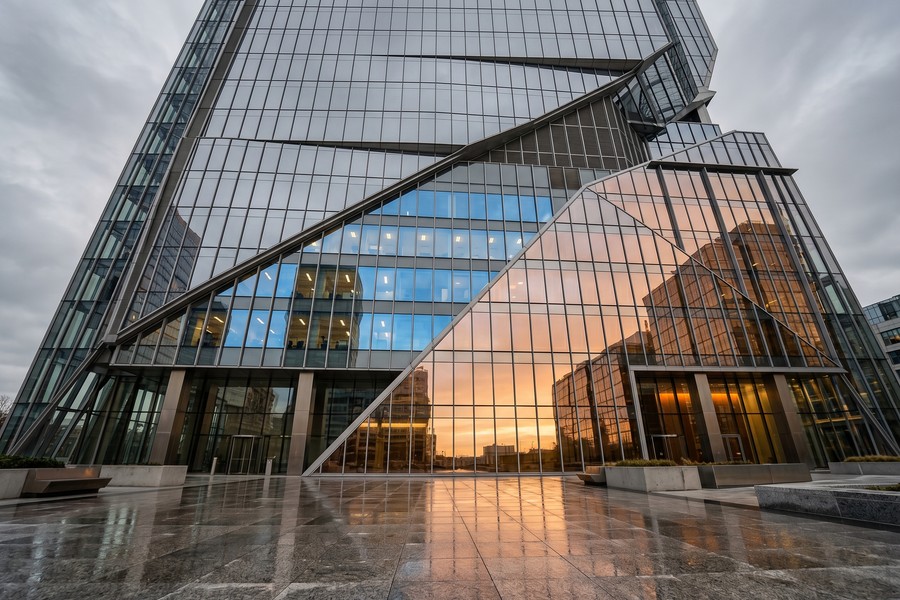
Architecture photography presents some of the most challenging sky replacement scenarios: glass facades that reflect the sky, windows that show sky through interior spaces, and geometric structures with precise edge detail. These are the scenarios where automatic tools most consistently fail, and where manual masking expertise delivers results that justify the time cost.
The Future of AI-Powered Sky Editing
The pace of improvement in AI sky replacement is accelerating. What required expert manual skill in 2018 is now fully automated in 2024, and the trajectory suggests that most current manual workflow advantages will be matched by AI within three to five years.
Generative AI represents the next frontier. Rather than selecting from a library of pre-photographed skies, tools like Adobe Firefly can now generate entirely new sky environments based on text prompts — “stormy dramatic clouds at golden hour over a desert landscape” — and composite them seamlessly into existing photographs. Adobe Firefly’s generative capabilities are already integrated into Photoshop’s beta build as of 2024.
Generative Sky Creation
Generative sky replacement eliminates the library limitation entirely. Instead of choosing from 100 pre-made options, photographers will describe the sky they need and generate it on demand. Early tests of Firefly’s sky generation show impressive results on clean horizon scenes, though complex foreground integration still requires human refinement.
This development parallels broader AI trends reshaping creative technology. The underlying architecture driving these tools — transformer models and diffusion networks — is the same technology powering advances in AI we’ve covered in our examination of how quantum computing will transform everyday technology. The computational demands of generative AI may eventually make quantum acceleration a practical necessity for real-time creative tools.
Real-Time Sky Replacement on Video
The next major breakthrough is real-time sky replacement in video footage. Several apps, including Runway ML and CapCut, already offer frame-by-frame sky replacement for video, though consistency across frames (avoiding “flickering” at edges) remains a significant technical challenge. As of 2024, the best video sky replacement tools achieve approximately 65% frame consistency without manual keyframe adjustment.
Apple’s Vision Pro headset includes a real-time environment replacement feature that uses the same core semantic segmentation technology as photo sky replacement tools — a sign that this AI capability is rapidly moving beyond photography into broader spatial computing applications.
“In five years, I expect the gap between AI and manual sky replacement to be essentially closed for 90% of use cases. The remaining 10% — the edge cases, the complex composites, the ultra-high-res commercial work — will still need human expertise. But the baseline has shifted permanently.”
Real-World Example: How a Real Estate Photographer Cut Editing Time by 87% Without Sacrificing Quality
Marcus T., a real estate photographer based in Denver, Colorado, was spending an average of 45 minutes per exterior shot on manual sky replacement in Photoshop — a workflow he’d used for six years. Shooting an average of 8 properties per week, each with 4–6 exterior images, he was investing 24–36 hours per week on sky correction alone. At his rate of $85/hour for post-processing, that represented $2,040–$3,060 in weekly labor costs — unsustainable for a solo operator.
In March 2023, Marcus switched to Luminar Neo as his primary sky replacement photo app for real estate work. He created a library of 12 custom skies matched to Denver’s typical weather conditions and lighting, then developed a batch processing workflow that applied his preferred sky template to all exterior shots from each shoot automatically. Initial processing of 6 exterior shots dropped from 4.5 hours to under 25 minutes. His weekly sky replacement time fell from 30 hours to approximately 4 hours — a reduction of 87%.
The quality comparison was illuminating. On clean modern architecture, clients could not reliably distinguish the Luminar Neo output from his manual Photoshop work in a blind test he ran with 12 real estate agents. For older properties with complex landscaping and tree overhangs, about 20% of images still needed 10–15 minutes of manual refinement in Photoshop after the initial AI pass. Marcus now uses a hybrid workflow: Luminar Neo for batch processing, Photoshop for the complex 20%.
The financial impact was direct and immediate. By reclaiming 26 hours per week, Marcus was able to take on three additional property shoots per week — generating an extra $1,800–$2,400 per week in shoot revenue. His annual income increased by approximately $78,000 in the first year after switching, while his editing software costs increased by only $119.40 per year for the Luminar Neo subscription. He considers the switch the single best business decision he made in a decade of professional photography.
Your Action Plan
-
Audit your current sky replacement workflow and time cost
Track exactly how many images you process per week that require sky replacement and how long each takes. Multiply by your hourly rate or opportunity cost. This baseline number will tell you whether automation saves you meaningful time — and money.
-
Identify your primary output format and viewing context
If your images are primarily viewed on screens at web resolution (under 2,000 pixels wide), automatic AI tools will deliver results indistinguishable from manual work for most viewers. If you print large, submit to competitions, or deliver commercial advertising work, plan for a manual or hybrid workflow.
-
Test Luminar Neo’s free trial on your actual image library
Download Luminar Neo’s 7-day free trial and run your 10 most challenging sky replacement images through it. Evaluate edge quality, lighting matching, and overall realism on your specific shooting style and subject matter. This real-world test is more useful than any benchmark comparison.
-
Evaluate Adobe Photoshop’s Sky Replacement if you already subscribe
If you have an active Adobe Creative Cloud or Photography Plan subscription, Photoshop’s Sky Replacement is already available at no additional cost. Test it head-to-head against Luminar Neo on your sample images before paying for a dedicated tool.
-
Build a custom sky library matched to your shooting conditions
Photograph 20–30 compelling skies yourself during your travels or on dedicated photography outings. Using your own skies — matched to your camera’s color profile and your geographic region’s light quality — produces far more convincing composites than generic stock skies.
-
Develop a hybrid workflow for complex images
Use automatic sky replacement for the initial pass on all images, then identify the 15–20% that need manual refinement and address those in Photoshop. This hybrid approach captures 80–90% of the time savings from automation while maintaining professional quality on difficult images.
-
Learn the three most critical manual refinement techniques
Even if you use automatic tools primarily, master these three manual skills: the Refine Edge brush in Photoshop for recovering fine detail, color temperature adjustment layers for lighting matching, and luminosity mask-based foreground relight. These three techniques fix 90% of the issues automatic tools leave behind.
-
Review your app subscriptions annually for cost efficiency
The sky replacement app market evolves rapidly — what costs $9.95/month today may be free in a competing app within 12 months. Set a calendar reminder to re-evaluate your tool stack every year against current alternatives. Use a structured subscription audit process to ensure you’re not paying for overlapping features across multiple apps.
Frequently Asked Questions
What is the best sky replacement photo app for beginners?
Luminar Neo is widely recommended for beginners because it combines one-click automatic processing with a large built-in sky library and an intuitive interface. The AI handles all the technical masking automatically, so users can focus on choosing the right sky rather than learning complex selection techniques. Its trial period lets you test it risk-free before committing to a subscription.
Can I use sky replacement on phone photos without a computer?
Yes. Mobile apps including PhotoRoom, Canva, and YouCam Perfect all offer automatic sky replacement that runs entirely on your smartphone. Processing quality is slightly lower than desktop alternatives due to file resolution and computational limits, but results are more than adequate for social media use. For JPEG images from a modern smartphone, the quality gap between mobile and desktop sky replacement has narrowed significantly since 2022.
Does Photoshop’s sky replacement tool work on RAW files?
Photoshop’s Sky Replacement feature works on any image open in the Photoshop workspace, including RAW files that have been processed through Adobe Camera Raw or Lightroom. However, sky replacement is a pixel-based operation, so Photoshop will automatically rasterize the image before applying the effect. Working at RAW quality in 16-bit mode before rasterizing gives you the best possible starting point for sky replacement in Photoshop.
How do I make sky replacement look realistic?
The most important factor is lighting coherence — your foreground must match the color temperature and intensity of your new sky. After applying the replacement, add a color balance adjustment layer set to match the sky’s dominant tones and paint it subtly over foreground surfaces. Additionally, ensure the new sky’s perspective (horizon height, cloud angle) matches the shooting angle of the original photograph. These two adjustments resolve the majority of realism issues in sky composites.
Is sky replacement considered photo manipulation?
Yes — sky replacement is universally considered photo manipulation, and its appropriateness depends entirely on context. For personal, editorial, and commercial photography, it is widely accepted practice. For photojournalism, documentary photography, and certain competitions, it is explicitly prohibited. Always check the submission guidelines of any competition or publication before submitting work that uses sky replacement. Transparency with clients about your editing process is also best practice in professional photography.
What’s the difference between sky replacement and background removal?
Sky replacement swaps only the sky region of a photograph while keeping the entire foreground intact. Background removal isolates a subject completely — typically a person or product — and removes or replaces the entire background. Both use similar AI masking technology, but sky replacement is more specialized because it must handle complex, irregular foreground objects like trees and buildings rather than clean subject cutouts. Many apps offer both features in the same toolkit.
How many skies do I need in my library for variety?
For most photographers, a library of 30–50 skies provides adequate variety to match the mood, time of day, and weather conditions needed across typical shoots. Organize your library by category: blue sky (midday, various cloud densities), golden hour, dramatic overcast, sunset/sunrise, and night. Having 5–8 options in each category prevents your work from looking repetitive across a portfolio. If you shoot a specific niche like real estate, a smaller, more curated library of 15–20 regionally appropriate skies often produces more consistent results than a large generic collection.
Can sky replacement be detected in photos?
Experienced photographers and retouchers can often identify sky replacement by looking for lighting inconsistencies, unnatural edge transitions, mismatched atmospheric haze, and perspective errors. Automatic detection tools also exist — platforms like Hive Moderation and Content Authenticity Initiative (CAI) tools can analyze metadata and pixel statistics to flag AI-processed images. As AI-generated and AI-edited images become more prevalent, content authenticity verification is becoming increasingly important across publishing and social media platforms.
Do free sky replacement apps put watermarks on photos?
Most free-tier sky replacement apps, including PhotoRoom’s free version and YouCam Perfect’s free tier, apply watermarks to exported images. Removing the watermark typically requires upgrading to a paid subscription, which usually starts at $7.99–$9.99/month. Snapseed is a notable exception — it is fully free with no watermarks and no subscription, though it requires manual sky replacement rather than automatic AI processing.
How does sky replacement affect image file size?
Sky replacement itself does not inherently increase or decrease file size. However, if the process is applied destructively (flattening layers and re-exporting as JPEG), each export cycle introduces additional compression artifacts. For maximum quality, always work in a non-destructive format — Photoshop PSD, Luminar NEF, or TIFF — and export to JPEG only as the final delivery step. Repeated JPEG re-compression is one of the most common ways photographers unknowingly degrade image quality through editing workflows.
Sources
- Grand View Research — Photo Editing Software Market Size & Forecast
- Digital Photography Review — Camera and Software Reviews
- Adobe Help Center — Replace Sky in Photoshop
- Adobe Firefly — Getting Started with Generative AI Features
- Photography Life — Sky Replacement Tool Comparisons and Tutorials
- Skylum — Luminar Neo Sky AI Feature Overview
- The Verge — Adobe Photoshop Sky Replacement Feature Review
- PetaPixel — How to Use Photoshop’s Sky Replacement Tool
- Content Authenticity Initiative — Image Provenance and AI Disclosure Standards
- The Irish Times — AI Image Editing Market Growth 2024
- Adobe — Creative Cloud Photography Plan Pricing
- Google Trends — Search Interest Data Methodology
- PhotoRoom — AI Sky Replacement Feature Details
- National Geographic — Ethics of Photo Manipulation in Documentary Work
- Runway ML — AI Video Sky Replacement and Generative Tools






