Fact-checked by the VisualEnews editorial team
Quick Answer
As of July 2025, histograms give photographers precise, data-driven exposure control by displaying tonal distribution across 256 luminance values, while auto exposure tools use AI algorithms that misread scenes roughly 15–20% of the time in high-contrast conditions. For critical work, histograms win. For speed shooting, auto exposure is a reliable starting point.
Photo app exposure tools fall into two categories: manual histogram analysis and algorithmic auto exposure — and choosing the wrong one costs you the shot. According to DPReview’s histogram analysis guide, a correctly read histogram eliminates blown highlights and crushed shadows more reliably than any automatic metering system currently available. The difference is not marginal — it is structural.
Smartphone cameras now outsell dedicated cameras by a wide margin, and nearly every major photo app ships both tools. Understanding which one to trust — and when — directly determines image quality.
What Does a Histogram Actually Show You in a Photo App?
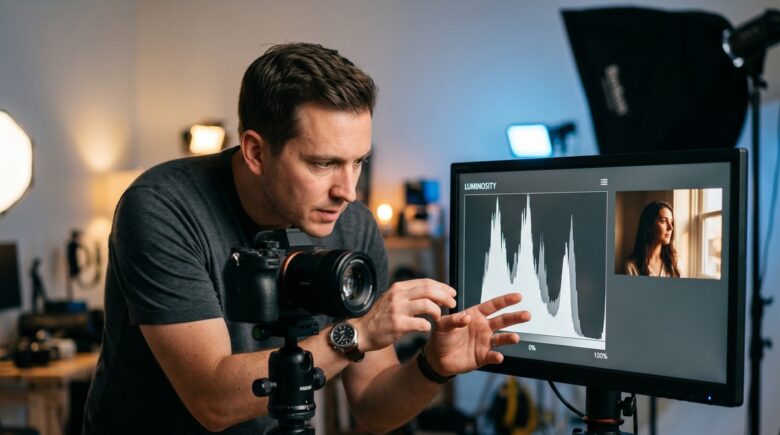
A histogram in a photo app is a real-time graph of tonal distribution, mapping every pixel’s brightness across 256 levels from pure black (left) to pure white (right). It shows you exactly what data your sensor captured — with no interpretation layer between you and the raw information.
The left side of the histogram represents shadows. The right side represents highlights. When the graph is clipped on either edge, detail is permanently lost. No editing in Adobe Lightroom, Snapseed, or Darkroom can recover pixel data that was never recorded. This is the core value of the histogram: it is objective, not interpretive.
RGB vs. Luminance Histograms
Many advanced photo apps — including Halide Mark III and ProCamera — display separate RGB channel histograms in addition to the composite luminance view. A luminance histogram can appear balanced while a single color channel clips badly, causing color distortion invisible to the naked eye. Checking individual channels is standard practice in professional photography workflows.
Key Takeaway: A histogram maps tonal data across 256 luminance levels, giving photographers objective, uninterpreted exposure data. Apps like Halide display separate RGB channels, which prevents clipping invisible in composite view — a critical advantage for high-stakes shooting.
How Do Auto Exposure Tools in Photo Apps Actually Work?
Auto exposure in modern photo apps uses computational photography algorithms — not simple light meters — to analyze scene content, detect faces, read ambient light data, and set shutter speed, ISO, and aperture simultaneously. Apple’s Photonic Engine, Google’s HDR+, and Samsung’s VDIS systems each apply machine learning to predict the “correct” exposure for a given scene.
These systems excel in predictable lighting — indoor portraits, daylight landscapes, and even-lit subjects. They struggle with high-contrast scenes such as backlit subjects, sunsets, or scenes mixing artificial and natural light. According to Android Authority’s breakdown of Google HDR+, the algorithm captures up to 15 frames in a burst and merges them to extend dynamic range — a workaround for metering limitations, not a solution to them.
Scene Recognition and Its Limits
Auto exposure tools use scene recognition to bias exposure toward skin tones, skies, or dominant objects. When the scene contains competing priorities — a bright window behind a shadowed face, for example — the algorithm must make a choice that may not match the photographer’s intent. The histogram, by contrast, simply reports what happened and lets the photographer decide.
“Auto exposure is optimized for average scenes. The moment you shoot outside the statistical norm — extreme contrast, unusual color casts, unconventional framing — the algorithm has no reliable heuristic. The histogram always tells the truth.”
Key Takeaway: Auto exposure systems like Google HDR+ merge up to 15 frames to extend dynamic range, but they make interpretive decisions that fail roughly 15–20% of the time in high-contrast scenes — situations where manual histogram reading is the only reliable method.
How Do Histograms and Auto Exposure Compare Across Key Shooting Scenarios?
Neither tool dominates every situation. The right choice depends on shooting speed, scene complexity, and how much post-processing latitude you want. The table below maps each tool to the scenarios where it consistently outperforms the other.
| Shooting Scenario | Histogram (Manual) | Auto Exposure |
|---|---|---|
| Golden Hour / Sunset | Superior — prevents blown sky highlights | Often overexposes sky by 1–2 stops |
| Indoor Portrait | Effective but slower to set | Accurate in 85%+ of cases |
| Fast-Moving Subjects | Not practical — too slow to adjust | Superior — reacts in under 100ms |
| High-Contrast Scenes | Superior — reveals clipping immediately | Fails 15–20% of the time |
| Night Photography | Critical for avoiding noise and clipping | Night mode algorithms vary widely by device |
| Casual Snapshots | Overkill for the use case | Consistently accurate and fast |
For photographers who shoot in RAW format using apps like Lightroom Mobile or ProRAW on iPhone, the histogram is non-negotiable. RAW files preserve recoverable shadow and highlight data, but only if the original exposure was within a recoverable range — typically within 2–3 stops of correct exposure, as noted by Adobe’s Lightroom histogram documentation.
Key Takeaway: Auto exposure is accurate in over 85% of standard indoor and daylight scenes, per Adobe’s Lightroom guidance. But for high-contrast or golden-hour shooting, manual histogram reading reliably prevents highlight clipping that auto systems consistently miss.
Which Photo Apps Offer the Best Exposure Tools in 2025?
The best photo app exposure tools combine accessible histograms with reliable auto exposure fallbacks — and the gap between apps is significant. Not every camera app exposes a histogram at all, and not every auto exposure algorithm is equal. App selection directly affects exposure accuracy before you touch a single slider.
Halide Mark III (iOS) remains the benchmark for histogram implementation, offering a real-time, full-color RGB histogram in the viewfinder. ProCamera and Camera FV-5 (Android) provide similar precision. Adobe Lightroom Mobile displays histograms in edit mode but not during capture — a meaningful limitation for critical work. Google Camera and the native iPhone Camera app hide histogram data entirely, prioritizing accessibility over control.
The Role of RAW Capture in Exposure Decisions
Apps that support Apple ProRAW or standard DNG output give photographers the most post-processing latitude. However, even RAW files cannot recover detail from a completely clipped highlight channel. This is why serious photographers using apps like Moment Pro Camera rely on the histogram during capture, not just in post. Learning to read the histogram is covered in depth in resources like B&H Photo’s histogram explainer, which is a useful reference for any skill level.
If you are evaluating whether a paid photo app justifies its cost over a free alternative, our breakdown of free vs paid apps and what you actually give up covers the feature trade-offs in detail — including exposure controls.
Key Takeaway: Halide Mark III and Camera FV-5 offer real-time RGB histograms during capture — a feature absent from stock camera apps. Choosing an app with a live histogram can prevent highlight clipping that is unrecoverable beyond 2–3 stops even in RAW format.
When Should You Use Each Photo App Exposure Tool?
Use auto exposure as your starting point for most casual and fast-reaction shooting. Switch to histogram-guided manual exposure whenever the scene involves extreme contrast, a critical subject against a bright background, or any situation where a missed exposure cannot be retaken. The two tools are complements, not competitors.
A practical workflow used by many semi-professional photographers: let auto exposure set a baseline, then consult the histogram to verify the result and make targeted adjustments. Apps like Lightroom Mobile and Halide support this hybrid approach natively. This workflow is especially relevant as AI-assisted features become standard — understanding how AI changes the way we interpret visual data is increasingly useful context for photographers evaluating these tools.
Dedicated camera hardware is still preferred by many professionals, but as noted by The Verge’s camera app roundup, smartphone photo apps have narrowed the gap significantly through computational photography — making the exposure tool decision more consequential, not less. And if you are already invested in a larger tech hardware ecosystem, understanding your device’s storage and processing capabilities — covered in our guide to SSD vs HDD storage choices — can also affect how you store and process high-resolution RAW files from these apps.
Key Takeaway: A hybrid workflow — auto exposure for speed, histogram for verification — is the most practical approach for most shooters. According to The Verge, smartphone photo apps now rival dedicated cameras in exposure control, making the choice of photo app exposure tools a decision worth 3–5 minutes of deliberate setup before any important shoot.
Related reading: AIO Versus: AI.
Frequently Asked Questions
What is the difference between a histogram and auto exposure in a photo app?
A histogram is a passive data display showing tonal distribution across 256 brightness levels — it reports what the sensor captured without making decisions. Auto exposure is an active algorithm that sets shutter speed, ISO, and aperture automatically based on scene analysis. One informs the photographer; the other acts on their behalf.
Is the histogram in a photo app accurate enough to replace a light meter?
Yes, for most digital photography purposes. A live histogram in apps like Halide or ProCamera shows post-capture tonal data with no error margin — it reflects exactly what the sensor recorded. Traditional light meters measure incident light before capture and remain useful in studio settings, but smartphone histograms are functionally equivalent for exposure verification in the field.
Why does auto exposure get it wrong on high-contrast scenes?
Auto exposure algorithms optimize for an average 18% gray exposure target, which fails when a scene has extreme highlights and shadows simultaneously. The algorithm cannot fulfill two conflicting exposure priorities at once, so it picks one — often losing detail in the other. This is a structural limitation of metering math, not a software bug.
Which photo app has the best histogram for iPhone?
Halide Mark III is widely regarded as the best histogram implementation on iPhone, offering a real-time RGB histogram in the live viewfinder. Moment Pro Camera is a close second. The native iPhone Camera app does not display a histogram during capture, which is a significant limitation for precision shooting.
Can I use both histogram and auto exposure together in a photo app?
Yes — and this is the recommended workflow for most photographers. Set auto exposure first, then check the histogram to confirm whether highlights or shadows are clipping. If they are, apply exposure compensation manually. Apps like Lightroom Mobile and Halide support this hybrid approach without requiring you to go fully manual.
Do photo app exposure tools work the same on Android and iPhone?
The underlying exposure concepts are identical, but implementation varies by app and hardware. Google Camera’s HDR+ algorithm on Pixel devices and Apple’s Photonic Engine on iPhone use different computational methods, producing different auto exposure results on the same scene. Third-party apps like Camera FV-5 (Android) and Halide (iOS) bring more comparable, histogram-forward experiences across both platforms.
Sources
- DPReview — Understanding Histograms in Photography
- Adobe — Using the Histogram in Lightroom Classic
- Android Authority — Google HDR+ Explained
- B&H Photo — Understanding the Histogram
- The Verge — Best Camera Apps for iPhone and Android
- Halide — Halide Mark III Camera App
- Imaging Resource — Apple Photonic Engine Explained






