Fact-checked by the VisualEnews editorial team
Quick Answer
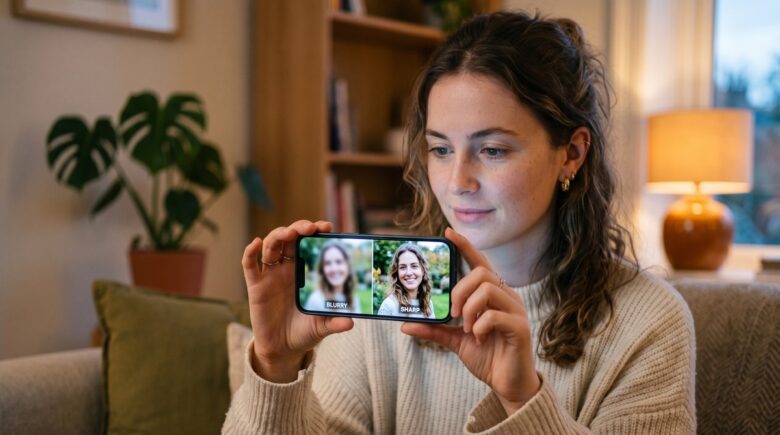
The best fix blurry photos app options in July 2025 include Remini, Topaz Photo AI, and Snapseed — each using AI upscaling or sharpening to recover detail from out-of-focus shots. Remini processes images in under 10 seconds and restores facial clarity with neural network enhancement, making it the top choice for most smartphone users.
A fix blurry photos app uses artificial intelligence and machine learning to reconstruct lost detail, sharpen edges, and reduce motion blur — tasks that were impossible on mobile just five years ago. According to Statista’s 2024 smartphone usage report, more than 6.8 billion people now own a smartphone, and the vast majority use it as their primary camera.
With this volume of photos being captured daily, blurry and out-of-focus images are among the most common complaints — and the app market has responded with powerful, AI-driven solutions worth knowing about now.
Why Do Photos Go Blurry on a Smartphone?
Smartphone photos go blurry for three primary reasons: camera shake during exposure, subject motion, and incorrect autofocus lock. Understanding the cause determines which fix blurry photos app feature will work best for your image.
Camera shake produces a directional motion blur across the entire frame. Subject motion creates a localized blur around a moving object while the background stays sharp. Focus blur (also called defocus or bokeh blur) softens detail uniformly when the lens focuses on the wrong plane.
How AI Deblurring Works
Modern apps use convolutional neural networks (CNNs) trained on millions of paired blurry-sharp image sets. The model learns to predict what the sharp version of a degraded image should look like, then reconstructs it pixel by pixel. Companies like Topaz Labs and Skylum have published technical documentation explaining how their deconvolution algorithms separate signal from noise during this process, as detailed in Topaz Labs’ Photo AI product overview.
Key Takeaway: Smartphone blur has 3 distinct causes — shake, motion, and defocus — and the best AI deblurring tools from Topaz Labs use convolutional neural networks trained on millions of image pairs to reconstruct lost detail automatically.
Which Are the Best Fix Blurry Photos Apps in 2025?
The top fix blurry photos app choices for smartphone users in 2025 are Remini, Topaz Photo AI, Snapseed, Adobe Lightroom Mobile, and VSCO. Each targets a different user type, from casual snappers to professional photographers.
Remini leads for portrait and face restoration, using proprietary GAN (Generative Adversarial Network) technology developed by Bending Spoons. It is available on iOS and Android and processes a single image enhancement in roughly 8–12 seconds on a modern device. Snapseed, developed by Google LLC, remains the strongest free option, with a dedicated “Details” brush that applies selective sharpening to precise areas of an image without degrading the background.
Desktop-Class Power on Mobile
Topaz Photo AI is primarily a desktop application for Windows and macOS, but its AI model is also accessible through Lightroom Classic plugins on desktop before transferring results to mobile for final sharing. For users who want a fully mobile workflow, Adobe Lightroom Mobile offers an AI-powered “Denoise” and sharpening suite that works directly on-device, as described in Adobe’s official Lightroom noise reduction documentation.
Understanding the real cost differences between these apps matters. As explored in our guide to free vs paid apps and what you actually give up, premium tiers often unlock batch processing and higher output resolution — features that matter when editing more than a few images.
| App | Platform | Price | Best For | Processing Speed |
|---|---|---|---|---|
| Remini | iOS, Android | Free / $9.99/mo | Face & portrait restoration | 8–12 seconds |
| Snapseed | iOS, Android | Free | Selective sharpening | 2–4 seconds |
| Topaz Photo AI | Windows, macOS | $199 one-time | Professional upscaling | 15–45 seconds |
| Adobe Lightroom Mobile | iOS, Android | Free / $9.99/mo | Full editing workflow | 5–10 seconds |
| VSCO | iOS, Android | Free / $29.99/yr | Aesthetic sharpening filters | 3–6 seconds |
Key Takeaway: Remini and Adobe Lightroom Mobile each cost $9.99 per month and deliver the strongest AI-assisted results on a pure mobile workflow, as confirmed by Adobe’s Lightroom sharpening documentation. Snapseed remains the best zero-cost option.
How Do You Use a Fix Blurry Photos App Effectively?
Using a fix blurry photos app effectively means choosing the right tool for the type of blur you have, then applying the enhancement at the correct output resolution. Applying AI sharpening to a severely under-exposed or low-resolution original will produce artifacts, not clarity.
For Remini, the workflow is straightforward: open the app, tap “Enhance,” select your blurry photo, and tap the enhance button. The app’s GAN model analyzes facial landmarks and texture maps before outputting a sharpened version. For non-portrait images, the “Sharpen” tab works better, applying edge detection rather than face-specific reconstruction.
Best Practices Before You Enhance
Start with the highest-resolution version of your image available. Crop first, enhance second — sending a smaller cropped region to the AI model often produces cleaner results than processing the full frame. Snapseed’s “Selective” tool lets you paint sharpness onto specific regions using a 0–100 scale for both Structure and Sharpness parameters. This level of control rivals what many desktop tools offer, according to Google’s official Snapseed support documentation.
“AI-based image restoration is no longer a post-production luxury — it is a standard expectation. Consumer apps like Remini have democratized what used to require hours of manual retouching in Photoshop, and the quality gap between professional and consumer tools is narrowing rapidly.”
Key Takeaway: For best results with any fix blurry photos app, crop your image first, then enhance — this gives the AI model a smaller, denser region to reconstruct. Snapseed’s selective sharpening tool offers precision on a 0–100 scale without requiring a paid subscription.
Are Free Fix Blurry Photos Apps Good Enough?
Free fix blurry photos app options are genuinely capable for everyday use, but paid tiers unlock batch processing, higher output resolution, and watermark-free exports that matter for professional or archival work. The capability gap has narrowed sharply since 2022.
Snapseed (free, by Google) handles selective sharpening and structure enhancement with no subscription. Adobe Lightroom Mobile‘s free tier includes manual sharpening sliders but locks AI-powered Denoise behind a Creative Cloud subscription starting at $9.99 per month. Remini’s free plan allows a limited number of daily enhancements — typically 5 free enhances per day — which is sufficient for occasional use but limiting for batch restoration projects.
Subscription costs for photo apps can add up quietly alongside streaming services and other digital tools. If you find yourself paying for multiple creative subscriptions, it is worth reading about how to audit digital subscriptions that drain your budget before adding another recurring charge.
AI-driven photo tools are part of a broader shift in how artificial intelligence is transforming everyday software. The same neural network advances powering photo restoration are also reshaping how AI is changing the way we search the internet and interact with apps across every category.
Key Takeaway: Free tools like Snapseed handle casual sharpening well, but paid plans — starting at $9.99/month for Remini or Lightroom — unlock AI Denoise and unlimited batch enhancements. See our free vs paid apps breakdown for a full cost-benefit analysis.
What Are the Limits of Photo Deblur Apps?
No fix blurry photos app can fully recover an image that is severely overexposed, shot at very high ISO with extreme noise, or blurred across more than roughly 30–40 pixels of motion displacement. AI enhancement fills in predicted detail — it does not retrieve information that was never captured by the sensor.
According to research published by arXiv’s computer vision research archive, even state-of-the-art blind deconvolution models achieve a peak signal-to-noise ratio (PSNR) improvement of approximately 1.5–3 dB on real-world motion blur — meaningful, but not infinite. Images with strong JPEG compression artifacts compound the problem, because the AI model must also work around block artifacts introduced during file compression.
The quality of your phone’s camera sensor also sets a hard ceiling. Understanding wider hardware performance trends — including how storage speed affects photo saving and processing — is useful context found in our comparison of solid state drives vs hard drives for anyone building a home editing setup.
Key Takeaway: Even the best AI deblur tools achieve a PSNR improvement of only 1.5–3 dB on real motion blur, according to arXiv’s computer vision research. Images blurred across more than 30–40 pixels of displacement are unlikely to recover usable detail regardless of the app used.
Frequently Asked Questions
What is the best free app to fix blurry photos on iPhone?
Snapseed by Google is the best free option for iPhone users. It offers a selective sharpening brush and a Details tool that enhances structure and sharpness independently, with no subscription required and no watermarks on exports.
Can a fix blurry photos app recover faces from old or damaged images?
Remini is the strongest tool for face recovery, using GAN technology specifically trained on facial landmark data. It can restore recognizable detail from low-resolution prints scanned at 72 DPI, though results vary based on the degree of original blur and compression.
Does Remini work on Android as well as iPhone?
Yes. Remini is available on both iOS (App Store) and Android (Google Play Store). The feature set is identical across platforms, and the free tier allows up to 5 AI enhancements per day on both operating systems.
Is Topaz Photo AI worth the price for smartphone photos?
Topaz Photo AI costs $199 as a one-time purchase and is designed for desktop use. It is worth the investment for photographers who regularly edit high-resolution files, but it is excessive for casual smartphone users who would be better served by Remini or Lightroom Mobile.
Can any app fix motion blur from a moving subject?
Motion blur from a moving subject is the hardest type to fix because the direction and distance of blur varies across the frame. Topaz Photo AI’s Motion Blur module and Adobe Camera Raw’s deblur filter offer the best results, but recovery is limited when displacement exceeds roughly 30 pixels.
How many times can I enhance a photo before quality degrades?
Applying AI enhancement more than once to the same image typically introduces softening or halation artifacts on the second pass. Most experts recommend a single enhancement pass, followed by manual sharpening adjustments using a tool like Snapseed or Lightroom Mobile if further refinement is needed.
Sources
- Statista — Number of Smartphone Users Worldwide 2024
- Topaz Labs — Topaz Photo AI Product Overview
- Adobe Help — Noise Reduction and Sharpening in Lightroom Classic
- Google — Snapseed Official Support Documentation
- arXiv — Deep Multi-Scale Convolutional Neural Network for Dynamic Scene Deblurring
- Google Play Store — Remini App Listing
- Apple App Store — Snapseed by Google






