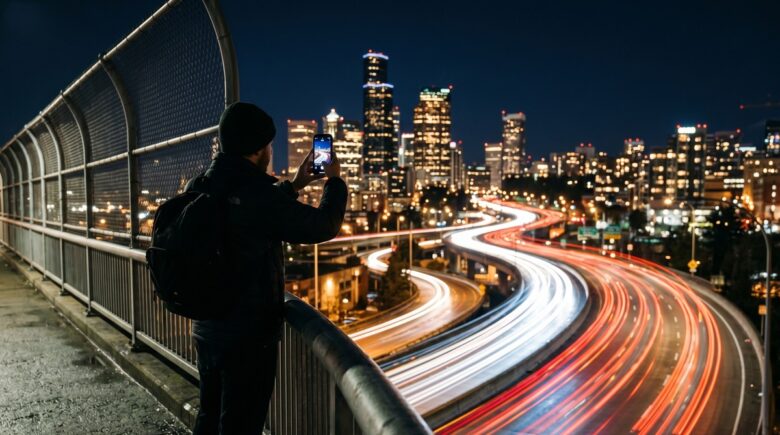
Fact-checked by the VisualEnews editorial team
Quick Answer
The best long exposure photo apps in July 2025 include Slow Shutter Cam, Camera+ 2, and ProCam 8 for iOS, and Camera FV-5 and Lightroom Mobile for Android. These apps offer shutter speeds as slow as 30 seconds, with free tiers available on at least 3 of the top 5, making light trail photography accessible on any smartphone.
A long exposure photo app lets your smartphone simulate the slow shutter speeds that create streaking car headlights, silky waterfalls, and glowing star trails — effects once reserved for DSLR cameras. According to Statista’s digital photography data, over 1.8 trillion photos are taken each year, and mobile photography now accounts for the majority of that output.
Long exposure techniques are surging on platforms like Instagram and 500px, pushing developers to build increasingly powerful manual controls directly into smartphone camera apps.
What Does a Long Exposure Photo App Actually Do?
A long exposure photo app extends your camera’s shutter open time to capture motion as a continuous blur while keeping stationary elements sharp. On a standard smartphone camera, the default shutter speed is typically 1/60 second or faster — far too quick to record light trails.
These apps work by either controlling native sensor exposure directly or by stacking multiple short frames in real time using computational photography. Apps like Slow Shutter Cam use frame blending, while Camera FV-5 on Android accesses the Camera2 API to push true long exposures up to 30 seconds. The difference matters: true sensor-based exposure captures less noise than frame-stacking on challenging low-light scenes.
Frame Stacking vs. True Long Exposure
Frame stacking combines dozens of short exposures into one image in real time. It is safer on handheld shots and works well for light trails. True long exposure, however, captures richer shadow detail and smoother motion blur. Adobe’s long exposure photography guide recommends true sensor exposure for any shot exceeding 10 seconds.
Key Takeaway: A long exposure photo app either controls the sensor directly or stacks frames computationally. True sensor exposure, available in apps like Camera FV-5, supports shutter speeds up to 30 seconds and produces cleaner results per Adobe’s photography documentation.
Which Long Shutter Speed Apps Work Best on iPhone?
Three iOS apps dominate light trail photography: Slow Shutter Cam, Camera+ 2, and ProCam 8. Each offers full manual shutter control, RAW capture, and dedicated light trail or motion blur modes.
Slow Shutter Cam by Cogitap Software costs $1.99 and is the most widely recommended iOS long exposure photo app for beginners. It features three capture modes — Motion Blur, Light Trail, and Low Light — each tuned for different shooting scenarios. ProCam 8 extends this with a full manual mode, supporting shutter speeds from 1/8000 second down to 30 seconds and RAW file export for post-processing in apps like Adobe Lightroom Mobile.
Built-In iPhone Long Exposure Mode
Since iOS 11, Apple’s native camera has included a Live Photo long exposure effect. It works by processing Live Photo frames into a single blurred composite. While convenient, it is limited to approximately 3 seconds of effective exposure and lacks manual control. For serious light trail work, a dedicated long exposure photo app remains the stronger choice.
“Smartphone sensors have reached a point where, with the right app giving you manual shutter control, you can achieve long exposure results that are genuinely indistinguishable from entry-level DSLR output — especially for light trails shot at ISO 100 to 400.”
Key Takeaway: For iPhone users, Slow Shutter Cam ($1.99) and ProCam 8 are the top-rated long exposure photo apps, with ProCam 8 supporting shutter speeds down to 30 seconds and full RAW export. More on evaluating free vs. paid app trade-offs can help you decide which tier fits your needs.
Which Long Exposure Photo Apps Lead on Android?
Camera FV-5 and Adobe Lightroom Mobile are the strongest Android long exposure photo app options in 2025. Camera FV-5 by FGAE directly accesses Android’s Camera2 API, enabling true hardware-level long exposures up to 30 seconds at a cost of $3.95.
Adobe Lightroom Mobile is free with optional Premium subscription at $4.99 per month. Its Pro Mode offers manual shutter control down to 1 second on most Android devices — less capable than Camera FV-5 for extreme exposures but superior for integrated RAW editing and cloud sync. NightCap Camera, though primarily an iOS app, has inspired several Android alternatives like ProShot, which supports exposures up to 60 seconds on compatible hardware.
| App | Platform | Max Shutter Speed | Price | RAW Support |
|---|---|---|---|---|
| Slow Shutter Cam | iOS | 30 seconds | $1.99 | No |
| ProCam 8 | iOS | 30 seconds | $5.99 | Yes |
| Camera+ 2 | iOS | 15 seconds | $2.99 | Yes |
| Camera FV-5 | Android | 30 seconds | $3.95 | Yes |
| Adobe Lightroom Mobile | iOS / Android | 1 second (free) / 30 sec (Premium) | Free / $4.99/mo | Yes |
| ProShot | Android / iOS | 60 seconds | $3.99 | Yes |
Key Takeaway: Android users get the best hardware-level long exposure control from Camera FV-5 ($3.95), which accesses the Camera2 API for true 30-second exposures. For a deeper look at what free apps cost you in features, the trade-offs are worth understanding before downloading.
How Do You Actually Shoot Light Trails With a Long Exposure Photo App?
Successful light trail photography with a long exposure photo app requires three fundamentals: a stable mount, the right timing, and correct exposure settings. Without stability, even a 2-second exposure produces a blurred, unusable image.
Use a mini tripod or set your phone flat against a fixed surface. Shoot during the blue hour — the 20-minute window after sunset when ambient sky light balances artificial street and car light. Set your ISO to 100 or 200 to minimize noise, choose a shutter speed between 8 and 20 seconds, and use the app’s self-timer or a Bluetooth shutter release to avoid camera shake. Digital Photography School’s light trail guide confirms that blue hour produces the most balanced exposures for urban trail shots.
Settings Checklist for Light Trail Shots
- Shutter speed: 8–20 seconds for moving vehicles
- ISO: 100–200 to reduce digital noise
- Aperture: f/8 or narrower if your app supports it
- Focus mode: Manual, locked to infinity or a fixed point
- Timer: 2-second delay or Bluetooth remote trigger
If you enjoy experimenting with mobile tech for creative use, you may also find value in understanding how AI is reshaping image discovery and search, since AI-curated photography feeds increasingly surface long exposure content.
Key Takeaway: The optimal light trail exposure window is 8–20 seconds at ISO 100–200, shot during blue hour. A tripod and self-timer are essential. Per Digital Photography School, blue hour sky luminance prevents blown-out backgrounds in urban scenes.
Are Free Long Exposure Apps Worth Using?
Free long exposure apps can produce quality light trail images, but they consistently limit maximum shutter duration, remove RAW export, and insert watermarks. The gap between free and paid performance is measurable and significant.
Adobe Lightroom Mobile’s free tier caps manual shutter at 1 second — sufficient for some slow-motion water effects but too brief for vehicle light trails, which typically require a minimum of 5–8 seconds. Free versions of apps like Manual — Custom Exposure Camera restrict shutter speed to 4 seconds without a $2.99 upgrade. The total cost of the most capable paid long exposure photo app in your ecosystem — iOS or Android — is typically under $6 one-time, which makes paid tiers the clear value choice for serious use. As explored in our guide to free vs. paid apps and what you actually give up, feature restrictions on free tiers often cost more in frustration than the upgrade price.
Subscription-based app costs add up over time, a pattern worth auditing. Our piece on auditing your digital subscriptions covers how to identify which recurring app costs deliver real value.
Key Takeaway: Free long exposure apps limit shutter speeds to 4 seconds or less, which is insufficient for light trails requiring 5–8+ seconds. Paid upgrades cost under $6 one-time, making them the practical choice, as detailed at VisualEnews’s free vs. paid app analysis.
Frequently Asked Questions
What is the best long exposure photo app for iPhone in 2025?
Slow Shutter Cam is the best long exposure photo app for iPhone beginners at $1.99, offering dedicated Light Trail and Motion Blur modes. ProCam 8 ($5.99) is the top choice for advanced users who need RAW export and manual shutter speeds down to 30 seconds.
Can I do long exposure photography without a tripod?
Technically yes, but results are poor for exposures longer than 2 seconds. Any camera movement during a long exposure registers as blur across the entire frame, not just moving subjects. A mini tripod or placing your phone against a firm surface is strongly recommended for exposures of 5 seconds or more.
Does the iPhone have a built-in long exposure mode?
Yes. Since iOS 11, iPhones can apply a long exposure effect to Live Photos in the Photos app. However, this effect is limited to roughly 3 seconds of blended exposure and offers no manual control. A dedicated long exposure photo app provides far more creative range.
What shutter speed do I need for car light trails?
For car light trails on a standard road, a shutter speed of 8 to 15 seconds is the most reliable range. Faster-moving vehicles on highways may only need 5 seconds, while slower urban traffic benefits from 15 to 20 seconds to produce continuous, unbroken streaks.
Is Camera FV-5 the best Android long exposure app?
Camera FV-5 is widely considered the most capable Android long exposure photo app due to its direct Camera2 API access, which enables true hardware exposures up to 30 seconds. ProShot offers exposures up to 60 seconds on compatible devices, making it a strong alternative for advanced Android users.
How do I reduce noise in long exposure phone photos?
Set your ISO as low as possible — ideally ISO 100 or 200 — before increasing shutter speed. Many long exposure apps include a long exposure noise reduction (LENR) setting that captures a dark frame immediately after the shot and subtracts hot pixels automatically. Shooting in RAW also preserves more data for noise reduction in post-processing.
Sources
- Statista — Number of Digital Photos Taken Worldwide
- Adobe Creative Cloud — Long Exposure Photography Guide
- Digital Photography School — Complete Guide to Light Trail Photography
- Cogitap Software — Slow Shutter Cam Official Page
- The Digital Story — Mobile Photography Resources by Derrick Story
- Google Play — Camera FV-5 by FGAE
- Adobe Help Center — Lightroom Mobile Pro Mode Manual Controls






