
Fact-checked by the VisualEnews editorial team
You already know the feeling: you click “Forgot Password” for the fourth time this week, and somewhere in the back of your mind, a small voice wonders if it’s finally time to get serious about security. Password manager alternatives have become a hot topic precisely because millions of people are stuck in this loop — cycling through weak, reused passwords while cybercriminals grow more sophisticated by the day. According to Verizon’s 2024 Data Breach Investigations Report, compromised credentials are involved in over 68% of all data breaches — a staggering figure that has barely budged in a decade.
The financial damage is equally alarming. IBM’s Cost of a Data Breach Report 2024 puts the average cost of a single breach at $4.88 million — a record high. For individuals, the picture is just as grim: the FTC reported that identity theft victims spent an average of 200 hours and thousands of dollars recovering their accounts and credit. Meanwhile, the FBI’s Internet Crime Complaint Center logged over 880,000 cybercrime complaints in 2023 alone, with losses exceeding $12.5 billion. Password reuse — using the same credentials across multiple sites — remains the single most exploited vulnerability at the consumer level.
This guide goes beyond simply recommending a password vault. You will learn eight concrete, layered strategies that dramatically reduce your digital exposure — from hardware security keys and passkeys to behavioral analytics and zero-trust networking. Whether you distrust cloud-based password managers, want to layer on extra defenses, or are exploring modern authentication for the first time, every section delivers specific, actionable steps you can take today.
Key Takeaways
- Compromised credentials fuel over 68% of data breaches, according to Verizon’s 2024 DBIR — making strong authentication the single highest-impact change you can make.
- Hardware security keys (FIDO2/WebAuthn) reduce account takeover risk by up to 99%, per Google’s own internal data from a 2019 study of 85,000 employees.
- Passkeys — the passwordless standard backed by Apple, Google, and Microsoft — eliminate phishing at the protocol level and are now supported by over 13 billion devices worldwide.
- The average identity theft recovery costs victims $1,343 out of pocket and 200+ hours of their time, according to the Identity Theft Resource Center (2023).
- Multi-factor authentication (MFA) blocks 99.9% of automated credential-stuffing attacks, per Microsoft’s Security Intelligence Report.
- Zero-knowledge encryption solutions, biometric authentication, and VPNs each add a distinct protective layer — together forming a defense-in-depth strategy that no single password manager can replicate.
In This Guide
- Why Password Managers Fall Short for Some Users
- Hardware Security Keys: The Gold Standard
- Passkeys and the Passwordless Future
- Multi-Factor Authentication Strategies That Actually Work
- Biometric Authentication: Beyond Fingerprints
- Zero-Knowledge Encryption Tools
- VPNs and Network-Level Security
- Behavioral Analytics and Identity Monitoring
- Password Manager Alternatives for Enterprises and Teams
- Building a Layered Defense Strategy
Why Password Managers Fall Short for Some Users
Password managers are excellent tools — but they are not perfect for everyone, and they are certainly not invincible. The LastPass breach of 2022 exposed encrypted password vaults belonging to millions of users, shaking consumer confidence across the industry. That single incident sent security professionals scrambling to evaluate password manager alternatives with renewed urgency.
The core vulnerability of any password manager is that it creates a single point of failure. If your master password is weak, reused, or phished, an attacker inherits access to every credential you own. Worse, cloud-synced vaults — the most popular type — can be targeted at the provider level, as LastPass demonstrated.
Who Needs Alternatives Most
Certain users face higher risk profiles where a password manager alone is insufficient. Small business owners handling customer payment data, healthcare workers managing HIPAA-sensitive logins, and remote workers connecting over public Wi-Fi all operate in threat environments that demand layered defenses.
Even everyday consumers benefit from going beyond a vault. If you use the same email address across dozens of accounts — which Pew Research found that 65% of Americans do — a single breach puts dozens of services at risk simultaneously.
The Cost of Over-Reliance
Over-relying on any single security tool creates complacency. Users who trust their password manager often skip enabling two-factor authentication, believing the vault is sufficient. That assumption cost victims dearly during the 2022 LastPass incident, when attackers used stolen vault data to target cryptocurrency holders — reportedly netting over $35 million in crypto theft linked to compromised LastPass data.
The 2022 LastPass breach affected over 33 million customers. Encrypted vaults were stolen, and attackers reportedly cracked weak master passwords to access cryptocurrency wallets, resulting in an estimated $35 million in losses for victims by early 2023.
This does not mean you should abandon password managers. It means they should be one layer of a broader strategy — not the entire fortress. Understanding what each alternative offers, and where it fits, is the real goal of this guide.
Hardware Security Keys: The Gold Standard
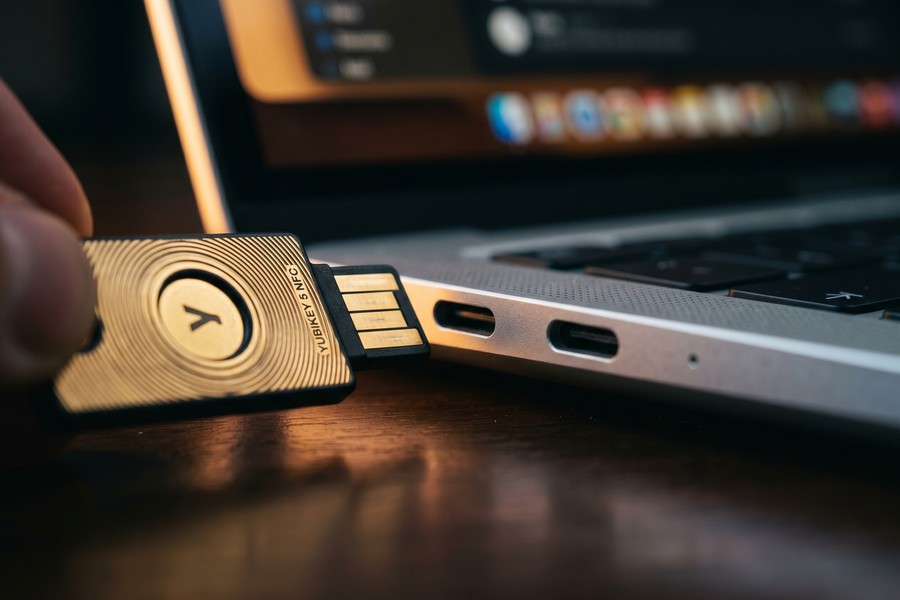
Hardware security keys are physical devices — typically USB or NFC — that prove your identity through cryptographic challenge-response authentication. They implement the FIDO2/WebAuthn standard, which means they are phishing-resistant by design. Unlike SMS codes or authenticator apps, a hardware key cannot be intercepted remotely because the private key never leaves the device.
Google’s own research, conducted across 85,000 employees who were required to use security keys starting in 2017, found that the company experienced zero successful phishing-based account takeovers. That is a statistic worth sitting with: zero. In an organization that size, over multiple years, the result was absolute.
Popular Hardware Key Options
| Device | Price | Protocols | Best For |
|---|---|---|---|
| YubiKey 5 NFC | $55 | FIDO2, OTP, Smart Card | Most users — broadest compatibility |
| Google Titan Key | $30 | FIDO2, FIDO U2F | Google Workspace users |
| Thetis FIDO2 | $25 | FIDO2, U2F | Budget-conscious consumers |
| OnlyKey | $47 | FIDO2, TOTP, SSH | Privacy-focused power users |
| Kensington VeriMark | $50 | FIDO2 + Fingerprint | Biometric + hardware combo |
Setting Up and Using a Security Key
Most major platforms — including Google, Microsoft, Apple, GitHub, Twitter/X, and Coinbase — support hardware keys as a second factor. Setup typically takes under five minutes: navigate to your account’s security settings, select “Add security key,” and follow the on-screen prompts while plugging in or tapping your device.
Security professionals recommend purchasing two keys and registering both. Keep one on your keychain and store the backup securely at home. Losing your only hardware key without a backup method can lock you out permanently. Budget around $55–$110 for a paired setup using YubiKey 5 NFC units, which is a small price for account takeover immunity.
Hardware security keys reduce account takeover risk by 99% compared to no second factor, and outperform SMS-based 2FA by eliminating SIM-swap and phishing vulnerabilities entirely — according to Google’s internal security research spanning 85,000 employees over two years.
One important caveat: not every website supports hardware keys yet. For services that don’t, you’ll need a fallback method — which is where authenticator apps and other strategies in this guide come in.
Passkeys and the Passwordless Future
Passkeys represent the most significant shift in authentication technology since passwords were invented. Built on the same FIDO2/WebAuthn cryptographic foundation as hardware keys, passkeys replace passwords entirely — using your device’s built-in biometrics (face scan or fingerprint) to authenticate you without transmitting any secret over the network.
Apple, Google, and Microsoft formally committed to passkey support in 2022 under the FIDO Alliance umbrella. As of 2024, passkeys are supported across iOS, Android, macOS, Windows, and Chrome — covering an estimated 13 billion active devices. Major services including Google, Apple, PayPal, GitHub, and eBay now offer passkey login.
How Passkeys Eliminate Phishing
When you create a passkey, your device generates a public-private key pair. The private key stays locked on your device behind biometric authentication. The website only stores the public key. Even if a phishing site tricks you into visiting it, your device checks that the site’s domain matches the registered domain — and refuses to authenticate if it doesn’t. The attack is neutralized at the protocol level.
This is a profound improvement over passwords and even over traditional MFA codes, which a sophisticated attacker can steal in real time using a “man-in-the-middle” proxy phishing kit. Those kits are now available for under $100 on dark web forums, making them accessible even to low-skill attackers.
Passkey vs. Password Manager: A Direct Comparison
| Feature | Passkey | Password Manager |
|---|---|---|
| Phishing resistance | Yes — protocol-level | No — autofill can be fooled |
| Credential storage | On-device (encrypted) | Cloud vault (encrypted) |
| Breach exposure risk | Very low | Moderate (vault theft possible) |
| Ease of use | Very easy (biometric) | Easy (autofill) |
| Cross-device sync | Via iCloud/Google/Microsoft | Via app ecosystem |
| Cost | Free | Free to $36/year |
Passkeys are arguably the most powerful of all password manager alternatives for everyday consumers because they are both more secure and easier to use. If you haven’t enabled passkeys on Google, Apple, or your banking apps yet, that is the first concrete action to take after reading this guide.
“Passkeys are the single most impactful technology for reducing consumer credential theft. They eliminate the credential itself — there’s nothing for an attacker to steal, phish, or crack.”
Multi-Factor Authentication Strategies That Actually Work
Multi-factor authentication (MFA) requires users to verify identity through two or more independent factors: something you know (password), something you have (device or key), and something you are (biometric). When implemented correctly, MFA is extraordinarily effective. Microsoft’s security data shows it blocks 99.9% of automated credential attacks outright.
Not all MFA methods are equal, however. SMS-based one-time codes — still the most common form — are vulnerable to SIM-swapping, where an attacker convinces your carrier to transfer your phone number to their device. The FBI issued a formal warning in 2021 after SIM-swap attacks caused over $68 million in losses in a single year.
MFA Methods Ranked by Security
| MFA Method | Security Level | Phishing Resistant | SIM-Swap Resistant |
|---|---|---|---|
| Hardware Key (FIDO2) | Highest | Yes | Yes |
| Passkey | Highest | Yes | Yes |
| TOTP App (Authy, Google Auth) | High | No | Yes |
| Push Notification (Duo, Microsoft) | High | Partial | Yes |
| Email OTP | Medium | No | Yes |
| SMS OTP | Low | No | No |
Time-Based One-Time Passwords (TOTP)
TOTP apps like Authy, Google Authenticator, and Microsoft Authenticator generate a six-digit code that refreshes every 30 seconds. Unlike SMS, the codes are generated locally on your device — meaning a SIM swap won’t expose them. Authy specifically adds encrypted cloud backup, so you don’t lose your codes if you replace your phone.
TOTP is not phishing-resistant — a sophisticated attacker can relay your code in real time — but it defeats the vast majority of automated credential-stuffing attacks. For most accounts where hardware keys aren’t supported, a TOTP app is the right choice.
If you are still relying on SMS text messages as your only second factor, you are vulnerable to SIM-swapping. Contact your carrier today and ask to add a “port freeze” or “SIM lock” to your account. This single step costs nothing and blocks most SIM-swap attempts.
Push-Based Authentication
Apps like Duo Security and Microsoft Authenticator offer push-based approval: you tap “Approve” or “Deny” when a login is attempted. This is highly convenient and more secure than SMS. However, MFA fatigue attacks have emerged as a threat — attackers flood a victim with push notifications until they approve one accidentally. Microsoft patched this partially with “number matching,” which requires you to type a code displayed on the login screen into the app.
If your organization uses Duo or Microsoft Authenticator, ensure number matching or geographic verification is enabled in your admin console. This simple configuration change dramatically reduces push fatigue success rates.
Biometric Authentication: Beyond Fingerprints
Biometric authentication uses physical or behavioral characteristics — fingerprints, facial geometry, iris patterns, or even typing rhythm — to verify identity. Modern smartphones have made biometrics mainstream, but the technology has evolved far beyond the fingerprint scanner on your phone’s home button.
Apple’s Face ID uses a 30,000-point infrared dot matrix to map facial geometry in three dimensions. According to Apple, the probability of a random face unlocking your device is approximately 1 in 1,000,000 — compared to 1 in 50,000 for Touch ID. That precision makes biometrics an exceptionally strong authentication layer when combined with device-level encryption.
Behavioral Biometrics
Behavioral biometrics analyze patterns in how you interact with devices — typing cadence, mouse movement, scroll speed, and even how you hold your phone. Companies like BioCatch and TypingDNA use these signals to authenticate users passively and continuously throughout a session, not just at login.
Banks have quietly deployed behavioral biometrics at scale. HSBC, for instance, uses voice and behavioral biometrics to protect over 15 million UK customers. The technology can detect account takeover in real time — flagging a session where the typing pattern suddenly shifts from the legitimate user’s baseline. Understanding how your digital identity is built from these behavioral signals helps you appreciate why attackers increasingly target behavioral data, not just passwords.
Biometric Risks to Understand
Biometrics are powerful, but they come with a specific risk: you cannot change your fingerprint or face the way you change a password. If biometric data is stolen from a poorly secured database, that credential is compromised permanently. This is why well-implemented biometric systems store a mathematical template — not a raw image — on a secure enclave chip, never transmitting it to a server.
Apple’s Secure Enclave and Android’s StrongBox store biometric templates in dedicated hardware that is physically isolated from the main processor. Even if your phone is compromised by malware, the biometric data cannot be extracted — it only confirms a match locally.
Always verify that any service collecting biometrics stores them as on-device templates and never uploads them to a cloud server. If a company cannot clearly explain their biometric data handling, that is a red flag worth taking seriously.

Zero-Knowledge Encryption Tools
Zero-knowledge encryption means a service provider holds your data in encrypted form and genuinely cannot decrypt it — even if compelled by law enforcement or breached by attackers. This architecture is the most robust approach to securing sensitive data in the cloud. As a password manager alternative for secure note storage, file storage, and communication, zero-knowledge tools offer exceptional protection.
Proton Mail, Proton Drive, and Standard Notes are well-established examples. They are used by journalists, attorneys, and activists who operate in high-threat environments — but the technology is accessible to anyone. Proton’s ecosystem, for instance, offers a fully functional free tier covering email, calendar, and file storage.
Zero-Knowledge vs. Standard Cloud Storage
| Service Type | Provider Sees Your Data | Breach Exposes Plaintext | Government Subpoena Risk |
|---|---|---|---|
| Zero-Knowledge (Proton, Standard Notes) | No | No | Very Low |
| Standard Cloud (Google Drive, Dropbox) | Yes | Possible | High |
| Encrypted but Provider-Keyed | Technically yes | Possible | Moderate |
Using Zero-Knowledge Tools in Practice
For most users, zero-knowledge tools are most valuable for storing recovery codes, sensitive documents, and private communications — not necessarily as a complete password replacement. Store your hardware key backup codes, your government ID scans, and your financial account recovery phrases in a zero-knowledge encrypted note service rather than a standard notes app.
Standard Notes offers extensions for encrypted spreadsheets and to-do lists. This makes it practical as a lightweight organizational tool with security baked in. Given how often digital subscriptions quietly accumulate and how rarely people audit their account access, having a zero-knowledge place to store that inventory is genuinely useful.
Store your two-factor backup codes and hardware key recovery codes in Standard Notes (zero-knowledge encrypted) rather than in your email or a standard notes app. If your email account is compromised, those backup codes won’t fall into an attacker’s hands.
VPNs and Network-Level Security
A Virtual Private Network (VPN) encrypts your internet traffic and masks your IP address, protecting credentials and session tokens from interception on untrusted networks. While a VPN does not replace authentication methods, it closes a significant attack surface — particularly for remote workers using coffee shop or hotel Wi-Fi.
The threat is real and quantifiable. A 2023 study by Proofpoint found that 35% of employees connect to corporate resources over personal networks without any VPN — exposing session cookies, which attackers can steal to bypass authentication entirely, even with MFA enabled. This technique, called session hijacking, is increasingly common because it sidesteps password security altogether.
Choosing a VPN That Actually Protects You
Not all VPNs are trustworthy. Free VPN services in particular have a documented history of logging user data and selling it to advertisers. A 2020 analysis of 150 free Android VPN apps found that 75% of them contained tracking libraries. For real security, choose a paid VPN with a verified no-log policy — ideally audited by an independent firm like Cure53 or SEC Consult.
Reputable options include Mullvad (audited, accepts cash payment for maximum privacy), ProtonVPN (audited, open source, free tier available), and ExpressVPN (audited). Budget around $5–$12 per month for a quality service. Connecting over public Wi-Fi without a VPN is like leaving your front door unlocked because your neighborhood seems safe.
DNS Security and Encrypted DNS
DNS-over-HTTPS (DoH) and DNS-over-TLS (DoT) encrypt your DNS queries — the requests your device makes to translate domain names into IP addresses. Without encrypted DNS, your internet service provider (and anyone monitoring the network) can see every website you visit, even if the connection itself is HTTPS encrypted.
Cloudflare’s 1.1.1.1 resolver and Google’s 8.8.8.8 both support DoH and DoT, and both are free to configure on any device or router. Enabling encrypted DNS takes about three minutes and eliminates a category of surveillance that most users don’t even know exists. If you’re interested in how network technologies are evolving, the differences between 5G and Wi-Fi 7 also have security implications worth exploring.
Behavioral Analytics and Identity Monitoring
Identity monitoring services scan the dark web, data broker databases, and breach repositories for your personal information — alerting you when your email, password, Social Security number, or financial data appears where it shouldn’t. These tools function as an early warning system, giving you a window to act before attackers do.
Services like HaveIBeenPwned (free), Mozilla Monitor (free), and commercial options like Experian IdentityWorks or Aura offer varying depths of coverage. HaveIBeenPwned indexes over 14 billion breached accounts and allows you to check any email address instantly. Mozilla Monitor sends ongoing alerts when new breaches include your data.
What to Do When You Get a Breach Alert
Speed matters enormously. Research from SpyCloud shows that attackers monetize stolen credentials within an average of 17 hours of a breach becoming available on criminal forums. When you receive a breach alert, your first 24 hours are critical: change the compromised password, revoke any active sessions on the affected service, and check whether the same password was used on other accounts.
The ripple effect of credential reuse is well-documented. If your LinkedIn password from a 2012 breach is the same one you use for your bank — which researchers at Virginia Tech found 52% of users still do years after a known breach — a credential-stuffing attack can wipe your savings account without any sophisticated hacking required.
“Credential stuffing is now fully automated and runs 24/7. Attackers buy breach data in bulk — sometimes a billion records for a few thousand dollars — and systematically try every combination against every major bank, retailer, and email provider.”
Credit Freezes: The Underused Nuclear Option
A credit freeze — also called a security freeze — prevents the three major credit bureaus (Equifax, Experian, TransUnion) from releasing your credit file to new lenders. This makes it nearly impossible for an identity thief to open new credit accounts in your name, even if they have your Social Security number. A credit freeze is free under federal law, available to any consumer at any time, and does not affect your existing credit or score.
The process takes about 15 minutes across all three bureaus and can be done online. You temporarily “thaw” the freeze when you legitimately apply for credit, then refreeze immediately. Given the scale of major data broker breaches — Equifax exposed 147 million records in 2017, affecting nearly half of all American adults — a credit freeze is one of the most powerful and overlooked password manager alternatives for financial identity protection.
Identity theft cost Americans $10.3 billion in 2023, according to the FTC — up from $8.8 billion in 2022. Victims who had credit freezes in place were dramatically less likely to experience new-account fraud, which accounted for 23% of all reported identity theft cases.
Password Manager Alternatives for Enterprises and Teams
For organizations, the stakes around authentication are even higher. A single compromised employee credential can expose an entire corporate network. Enterprise-grade password manager alternatives focus on centralized identity governance, single sign-on, and privileged access management — going well beyond what any individual password vault can offer.
Single Sign-On (SSO) allows employees to authenticate once — typically through a corporate identity provider — and access all authorized applications without separate passwords. Providers like Okta, Microsoft Entra ID (formerly Azure AD), and Ping Identity dominate this space. SSO eliminates hundreds of individual password exposures and centralizes authentication logging, making anomalous access patterns detectable in near-real-time.
Privileged Access Management (PAM)
PAM solutions like CyberArk and BeyondTrust control access to the most sensitive accounts — system administrators, database owners, financial systems. They enforce just-in-time access (granting elevated privileges for a specific task and immediately revoking them afterward), session recording, and automatic credential rotation. The cost is substantial — enterprise PAM deployments can run $50,000 to $500,000 annually — but the breach cost avoidance justifies the investment at scale.
For small businesses that can’t afford enterprise PAM, services like Rippling or JumpCloud offer SSO and directory services starting around $8–$15 per user per month. Even a 10-person team benefits significantly from centralized identity management. Remote workers specifically benefit from understanding how to use the right hardware for secure remote work alongside these software controls.
Zero Trust Architecture
Zero Trust is a security philosophy, not a product. It assumes that no user, device, or network segment is inherently trustworthy — every access request must be verified, regardless of where it originates. Organizations implement Zero Trust by combining continuous authentication, device posture checks, microsegmentation, and least-privilege access policies.
NIST published formal Zero Trust Architecture guidelines in Special Publication 800-207, which serves as the de facto standard for federal agencies and increasingly for private enterprises. Adopting even partial Zero Trust principles — like requiring device health checks before granting VPN access — meaningfully reduces breach risk without a complete infrastructure overhaul.
According to Gartner, 60% of enterprises will have formally adopted a Zero Trust strategy by 2025, up from fewer than 1% in 2020. This shift is driven primarily by the explosion of remote work and cloud adoption following the COVID-19 pandemic.
Building a Layered Defense Strategy
No single technology — not even the most sophisticated hardware key or passkey — is sufficient on its own. Security professionals describe the ideal posture as defense in depth: multiple independent layers that an attacker must defeat sequentially. Failing to breach one layer should not automatically expose the next.
Think of it like a medieval castle. The moat (network security/VPN), the walls (authentication), the guards (monitoring/alerts), and the inner keep (zero-knowledge encryption) each serve distinct purposes. Remove any one element and the castle becomes easier to breach. Combine them and the effort required to succeed becomes prohibitive for most attackers.
Mapping Tools to Threat Scenarios
Different threats call for different defenses. Credential stuffing attacks are stopped by strong authentication (passkeys, TOTP, hardware keys). Phishing is neutralized by phishing-resistant methods (passkeys, hardware keys). Network interception is blocked by VPNs and encrypted DNS. Account takeover is detected by identity monitoring. Financial fraud is prevented by credit freezes. Together, these tools address the full spectrum of threats facing individuals and organizations.
Understanding the future of computing helps contextualize these defenses. Emerging threats from quantum computing will eventually require post-quantum cryptographic standards — a transition NIST began formalizing in 2024. The authentication tools you adopt today should ideally be from vendors already planning their quantum-resistant migration paths.
The 20-Minute Security Audit
Most people dramatically overestimate how long it takes to meaningfully improve their security posture. In 20 minutes, you can: enable passkeys on your Google or Apple account (3 minutes), set up a TOTP app and migrate your top five accounts (10 minutes), check HaveIBeenPwned for your email address (1 minute), and initiate a credit freeze at all three bureaus (15 minutes, can be split across days).
The calculus is simple: these steps cost you less than half an hour and eliminate the most common attack vectors used against consumers today. The cost of not doing them is measured in hundreds of hours and thousands of dollars of recovery — as the Identity Theft Resource Center’s data makes painfully clear. Even managing the financial side of your digital life benefits from better security — knowing your high-yield savings account credentials are properly protected lets you bank online with genuine confidence.
“The best security isn’t the most complicated — it’s the combination of simple, high-impact controls applied consistently. Passkeys plus a hardware key plus a credit freeze will protect 95% of consumers from 95% of realistic threats.”
Combining phishing-resistant MFA (hardware key or passkey) with identity monitoring and a credit freeze addresses the three primary attack vectors responsible for over 80% of consumer identity theft cases, per the FTC’s 2023 Consumer Sentinel Network Report.
Real-World Example: How Marcus Rebuilt His Digital Security After a $4,200 Account Takeover
In March 2023, Marcus, a 34-year-old project manager in Austin, Texas, woke up to a string of alarming emails. His LinkedIn password — a reused credential he had not changed since 2019 — had been leveraged in a credential-stuffing attack to access his Amazon account. Within 47 minutes, an attacker placed $4,200 in orders, changed his shipping address, and attempted to access his linked PayPal account. Marcus had no second factor enabled on Amazon. His password manager contained the credentials, but he had never enabled the MFA that his manager supported.
The recovery process took Marcus 38 hours spread across two weeks: filing an FTC identity theft report, disputing the Amazon charges (which were ultimately refunded after 11 days), changing passwords across 23 accounts that shared variants of the compromised credential, and monitoring his credit for fraudulent activity. He had no credit freeze in place. The financial damage was recovered, but the time cost was irreplaceable.
After the incident, Marcus implemented a complete overhaul. He purchased two YubiKey 5 NFC units at $55 each, enabling hardware key authentication on Google, PayPal, GitHub, and his company’s Okta SSO. He migrated to Authy for TOTP on services that didn’t yet support hardware keys. He enrolled in Mozilla Monitor alerts and placed credit freezes with all three bureaus — a process that took 22 minutes total. He also enabled passkeys on both his Google and Apple accounts.
Fourteen months later, Marcus received two breach alerts from Mozilla Monitor for services he had accounts on. Both times, he was notified within 48 hours — well within the window to act. Because he had unique credentials (managed through a TOTP-protected vault for the handful of sites not yet supporting passkeys) and hardware key protection on critical accounts, neither alert translated into any actual account access. His investment of $110 in hardware keys, 22 minutes for credit freezes, and one afternoon of security setup had paid for itself many times over.
Your Action Plan
-
Enable Passkeys on Your Most Critical Accounts Today
Navigate to the security settings of your Google, Apple, or Microsoft account and add a passkey. This takes under three minutes per account and provides phishing-resistant authentication that surpasses any password. Start with accounts tied to email, banking, and social media — these are the highest-value targets for attackers.
-
Purchase and Register a Hardware Security Key
Buy at least two YubiKey 5 NFC units (or a comparable FIDO2 key at your preferred price point) and register both on your most important accounts. Keep one on your keychain and store the backup at home or in a safe. This $55–$110 investment provides near-absolute protection against remote account takeover on supported services.
-
Replace SMS Two-Factor Authentication with a TOTP App
Download Authy or Google Authenticator and migrate your existing SMS-based 2FA accounts one by one. Prioritize email, financial services, and any account tied to payment information. Enable SIM lock with your mobile carrier as a parallel step — call customer service and request a port freeze on your account.
-
Check Your Email on HaveIBeenPwned
Visit HaveIBeenPwned and enter every email address you use. For any breaches found, immediately change the password on those services and any account where you reused that password. Sign up for ongoing notifications so you are alerted to future breaches within hours, not months.
-
Place a Credit Freeze at All Three Major Bureaus
Visit the online freeze portals for Equifax, Experian, and TransUnion — all three offer free, online credit freezes under federal law. The process takes roughly 20 minutes total. Store your freeze PINs in your zero-knowledge encrypted notes app. A frozen credit file makes new-account fraud nearly impossible even if your personal data is fully compromised.
-
Store Sensitive Data in a Zero-Knowledge Encrypted Service
Set up a free account with Standard Notes or ProtonDrive and migrate your sensitive document storage — recovery codes, ID scans, financial account numbers, and hardware key backup codes — out of unencrypted email drafts or standard notes apps. Zero-knowledge architecture means even a server breach cannot expose your data in readable form.
-
Secure Your Network with a VPN and Encrypted DNS
Subscribe to a audited, no-log VPN service (ProtonVPN or Mullvad are strong choices) and configure it to connect automatically on untrusted networks. Simultaneously, configure DNS-over-HTTPS on your devices using Cloudflare’s 1.1.1.1 resolver. Together, these steps close the network-level attack surface that session-hijacking and man-in-the-middle attacks exploit.
-
Audit Your Active Sessions and Connected Apps Quarterly
Set a recurring calendar reminder every 90 days to review active sessions on your major accounts and revoke any connected third-party apps you no longer use. Most platforms — Google, Facebook, Apple — provide a security dashboard showing every device and app with access to your account. Revoking stale access is free, takes 10 minutes, and eliminates dormant entry points that attackers frequently exploit.
Frequently Asked Questions
Are passkeys actually more secure than a password manager?
Yes, for a specific and important reason: passkeys are phishing-resistant by design. A password manager stores credentials that can be stolen if a user is tricked into entering them on a fake site or if the vault itself is breached. A passkey uses cryptographic challenge-response authentication that is bound to the legitimate domain — a phishing site cannot receive a valid passkey response even if the user visits it.
That said, passkeys and password managers are not mutually exclusive. Many users will still need a password manager for services that haven’t adopted passkeys yet. The ideal setup uses passkeys wherever supported, with a password manager handling the remaining legacy accounts.
What if I lose my hardware security key?
This is why security professionals always recommend registering two keys. If you lose your primary key, the backup allows you to regain account access. Additionally, most services let you register backup methods — a TOTP app, for instance — alongside your hardware key. After losing a key, immediately remove it from all registered accounts to prevent anyone who finds it from attempting to use it (though without your account credentials and PIN, the risk is low).
Is SMS two-factor authentication better than nothing?
Yes — significantly better. SMS 2FA stops the vast majority of automated credential-stuffing attacks because bots cannot intercept your text messages in real time. The weakness is against targeted attacks using SIM-swapping. For most users who are not high-value targets (celebrities, executives, cryptocurrency holders), SMS 2FA provides meaningful protection. But upgrading to a TOTP app is free, takes 10 minutes, and eliminates the SIM-swap risk entirely.
Do free VPNs provide real security?
Generally, no. Free VPN services have a well-documented history of logging user data, injecting ads into browser sessions, and selling usage information to data brokers. A 2020 analysis found that many free VPN apps contained embedded tracking SDKs. For genuine security — particularly protecting session cookies on public Wi-Fi — a paid, audited, no-log VPN is necessary. ProtonVPN’s free tier is a rare exception: it has been independently audited and operates under Swiss privacy law with a legitimate no-log policy.
How does a credit freeze differ from a fraud alert?
A fraud alert asks lenders to take extra steps to verify your identity before extending credit — it’s advisory. A credit freeze is a hard block: lenders cannot access your file at all, making it impossible to open new credit in your name. Fraud alerts are active for one year and do not require action from you when applying for credit. Freezes are permanent until you thaw them, requiring a brief process each time you legitimately apply for new credit. For most people who are not actively applying for loans, a freeze is the stronger protection.
Can behavioral biometrics be fooled by deepfakes or AI?
This is an emerging concern. Researchers have demonstrated that AI can generate synthetic typing patterns and mouse movements that fool some behavioral biometric systems. However, the more sophisticated enterprise systems — like BioCatch — use over 2,000 behavioral parameters simultaneously, making convincing synthesis significantly more difficult. The field is evolving rapidly on both sides. For now, behavioral biometrics remain highly effective in practice because the computational cost of fooling them in real time is prohibitive for most threat actors.
What is Zero Trust, and does it apply to individuals?
Zero Trust is primarily an enterprise architecture concept, but its core principle — never assume any device or network is inherently trustworthy — translates directly to personal security. For individuals, applying Zero Trust thinking means: always use a VPN on public networks, verify device security before syncing sensitive data, use separate email addresses for separate risk tiers (banking vs. newsletter signups), and treat every account as potentially compromised until proven otherwise.
Should I be worried about quantum computing breaking my passwords?
Not immediately, but the timeline is worth watching. Current RSA and ECC encryption — used by most authentication systems today — is theoretically vulnerable to sufficiently powerful quantum computers. NIST finalized its first set of post-quantum cryptographic standards in 2024. Major platforms will migrate over the coming decade. The authentication tools and vendors you choose should have public roadmaps for post-quantum transition. For more context on what this technology shift means, our overview of how quantum computing will change everyday technology is a useful primer.
How often should I audit my security setup?
Conduct a brief monthly check (review active sessions, check for breach alerts, verify MFA is still enabled on critical accounts) and a deeper quarterly audit (review connected third-party apps, confirm credit freeze is active, check for any new passkey-supported services to migrate). Annual audits should include reviewing which accounts still use SMS 2FA and migrating them to stronger methods as support improves.
Are password manager alternatives more expensive than a password manager?
Many of the most powerful alternatives are free: passkeys, credit freezes, HaveIBeenPwned monitoring, TOTP apps, and encrypted DNS all cost nothing. Hardware keys represent the primary upfront cost at $25–$110. A quality VPN runs $5–$12 per month. Compare this to a premium password manager subscription at $3–$5 per month — the total investment for a full layered defense is comparable, and the security outcome is dramatically stronger. As our analysis of free vs. paid apps shows, the free tier often involves hidden trade-offs that paid tools avoid.
Sources
- Verizon — 2024 Data Breach Investigations Report
- IBM Security — Cost of a Data Breach Report 2024
- FBI Internet Crime Complaint Center — 2023 Annual Report
- FIDO Alliance — Passkeys Overview and Adoption Statistics
- Google Security Blog — How Effective Is Basic Account Hygiene at Preventing Hijacking
- Microsoft Security Blog — One Simple Action to Prevent 99.9% of Account Attacks
- Identity Theft Resource Center — 2023 Consumer Impact Report
- Federal Trade Commission — Consumer Sentinel Network Data Book 2023
- HaveIBeenPwned — Data Breach Search and Notification Service
- NIST — Special Publication 800-207: Zero Trust Architecture
- Proofpoint — 2023 State of the Phish Report
- SpyCloud — 2023 Annual Credential Exposure Report
- Consumer Financial Protection Bureau — What Is a Credit Freeze
- Pew Research Center — Americans and Cybersecurity
- NIST — Post-Quantum Cryptography Standardization Project






