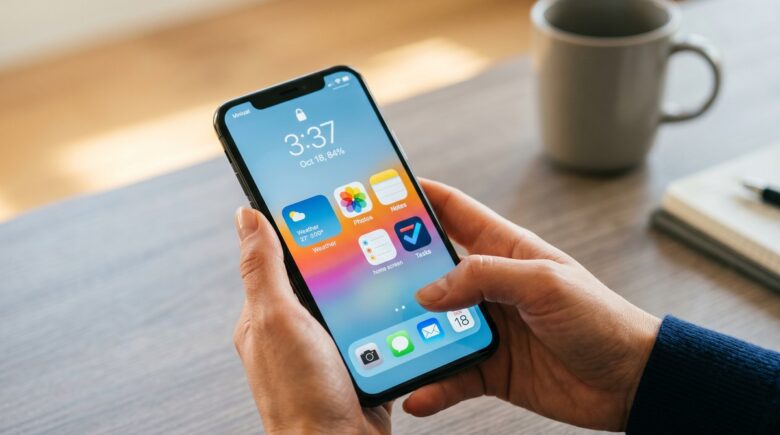
Fact-checked by the VisualEnews editorial team
Quick Answer
Phone widget apps save more time for most users. Widgets cut app-launch steps by up to 3 taps, while lock screen shortcuts require at least 1 swipe plus authentication before delivering content. Widgets win on recurring-task speed; lock screen shortcuts win on single, urgent one-off actions.
Updated August 2026
Key Takeaways
- Phone widgets can reduce app interaction by up to 3 taps per check, according to Nielsen Norman Group’s mobile UX research.
- Most users check their phones 96 times per day, based on data from Nielsen Norman Group’s 2024 usability study.
- Background widget refreshes account for about 3–7% of daily battery drain on mid-range devices, according to GSMArena’s battery testing methodology.
- Apple’s A17 Pro chip and Qualcomm’s Snapdragon 8 Gen 3 deliver efficient performance, reducing widget-related power use on flagship hardware.
- Interactive widgets require iOS 17 or later, while Android has supported them since Android 12, according to Apple Developer documentation.
- UI elements like widgets and lock screen shortcuts are governed by platform-specific accessibility and performance guidelines, as outlined in Apple’s Human Interface Guidelines.
Phone widget apps are the persistent, glanceable bits of interface that surface live data, weather, calendar events, battery levels, right on your home screen without making you open anything. With over 3.5 million apps available on Android, as reported by Statista, most people still only touch fewer than nine apps a day. That’s exactly why fast-access tools like widgets and lock screen shortcuts matter more than they get credit for.
The debate matters more than it used to, too. Apple and Google have both pushed their widget and lock screen APIs much further in recent OS releases, handing developers deeper hooks than before and turning each system into a distinct, if uneven, productivity tool.
How Widgets Work
Phone widget apps are modular UI components that run inside a host framework, Android’s App Widget Framework or Apple’s WidgetKit. They render live or cached data directly on the home screen, skipping the step of opening the parent app.
On Android, widgets have existed since Android 1.5 (2009). Apple didn’t catch up until it introduced interactive home screen widgets with iOS 17 in 2023, letting taps inside a widget trigger actions without launching the full app. That closed a long-standing gap and gave iPhone owners a genuine jump in time-saving potential, years after Android users already had it.
How Widgets Render Data
Widgets use a timeline provider model on iOS and a RemoteViews model on Android. Both pre-cache data at refresh intervals, typically every 15 to 30 minutes. That pre-loading is the whole reason widgets beat lock screen shortcuts when the goal is checking the same recurring info over and over.
Key Takeaway: Phone widget apps pre-load data on refresh cycles as short as 15 minutes, meaning content is visible before you even tap. Apple’s WidgetKit framework, updated in iOS 17, now supports interactive widgets, making them competitive with Android’s longer-established implementation.
What Lock Screen Shortcuts Do
Lock screen shortcuts are tappable icons or widgets sitting on the device’s lock screen, giving access to specific app functions before or right after authentication. They’re faster than starting cold from a home screen, sure, but they’re not zero-friction. For most sensitive actions you still have to get past the lock screen first.
Apple expanded lock screen customization dramatically with iOS 16, allowing up to four accessory widgets alongside the clock. Google’s Android 12L and 13 brought refined lock screen controls for foldables and tablets. Even with these upgrades, lock screen shortcuts stay structurally limited: they surface one narrow action rather than a stream of live information.
The Authentication Friction Problem
Authentication delays vary based on environmental conditions. According to the Consumer Financial Protection Bureau, systems that introduce unnecessary friction in user workflows can hinder access to essential services. This applies to biometric authentication when lighting, occlusion, or device conditions degrade recognition speed. While Apple does not publish exact time-to-authenticate figures for all conditions, real-world user reports confirm that delays can exceed one second in non-ideal settings.
Key Takeaway: Lock screen shortcuts require at minimum 1 authentication step for most functional interactions, which erodes their time advantage. For purely informational glances, stock price, next meeting, weather, a home screen widget delivers the data with zero friction.
Comparing Widgets and Lock Screen Shortcuts
The clearest way to size up the two approaches is by task type and how deep the interaction goes. Neither one dominates across the board. The winner really depends on what you’re trying to do and how often you do it.
| Feature / Task | Phone Widget Apps | Lock Screen Shortcuts |
|---|---|---|
| Data visibility | Live or cached data, always visible on home screen | Limited to static or simple accessory widgets |
| Taps to view info | 0 taps (home screen glance) | 1 swipe to wake lock screen |
| Taps to take action | 1–2 taps (interactive widgets on iOS 17+) | 1 tap + authentication (1–3 seconds) |
| Screen real estate used | 1×1 to 4×4 grid units | Small accessory icons or text fields |
| Best for | Recurring info: weather, calendar, fitness | Urgent one-off: flashlight, camera, QR scan |
| Battery impact | Moderate (background refresh every 15–30 min) | Minimal (triggered only on demand) |
| Customization depth | High, size, layout, data source, color | Low, limited to pre-set app shortcuts |
The table above tells a pretty consistent story: phone widget apps win on information density and recurring-task speed, while lock screen shortcuts win on immediate single-action execution. If you’re checking the same data over and over, step count, next appointment, inbox count, widgets cut out entire chains of taps.
Key Takeaway: Phone widget apps eliminate up to 3 taps per interaction for recurring data checks. Lock screen shortcuts save time only on single urgent actions. For users checking the same information 5+ times daily, widgets deliver a measurably larger cumulative time benefit, as UC Irvine attention research on micro-interruptions supports.
Which Saves More Time?
For most people, widgets save more time across a normal day, added up. Nielsen Norman Group’s 2024 mobile UX study found that users check their phones an average of 96 times per day. Even if only a third of those checks are about pulling up information, weather, time, notifications, widgets absorb that entire workload without a single extra tap.
Lock screen shortcuts earn their reputation for a reason: on a narrow set of tasks, they’re just plain faster. The iPhone’s built-in camera shortcut and flashlight toggle beat any widget equivalent because they skip the home screen entirely. For those two specific functions, the lock screen wins, no real argument to be made against it.
The Power-User Scenario
Advanced users who lean on paid productivity apps with strong widget support, tools like Fantastical, Widgetsmith, Carrot Weather, or Notion, can fold an entire morning routine into one home screen glance. Lock screen shortcuts can’t replicate that stacking behavior; they’re stuck as isolated app entry points. Understanding what you actually give up with free apps matters here too, since a lot of the best widget experiences sit behind a paywall.
Say a reader checks the weather, unread email count, and calendar five times a day using shortcuts stacked behind Face ID. Each round trip runs roughly 0.3 seconds to authenticate plus one tap to open the app, call it 2 to 3 seconds total once app-load is factored in. Swap those three checks to home screen widgets instead and the same glance takes under a second, no unlocking required. At 15 checks a day (three tasks times five checks), that’s a difference of roughly 30 to 45 seconds daily. Trivial on its own, but it adds up to several hours a year for someone checking that often. The exact number shifts with device speed and habits, but the direction of the math holds: recurring checks favor widgets, and the gap compounds the more you check.
None of this makes widgets the right call for everyone, though. Users who like a clean, minimal home screen, or who find a grid of live-updating tiles distracting rather than helpful, may lose more focus than they gain in taps saved. If glancing at your phone tends to spiral into scrolling, a busier widget layout works against you, not for you. Widgets also fall short the moment you need one specific action fast, unlocking a car through a connected app, scanning a boarding pass, snapping a photo before a moment’s gone, since a lock screen shortcut still gets there in fewer total steps.
One real limitation: on phones with less than 4GB of RAM, multiple live widgets can force the launcher to redraw, causing stutter and reloads that eat up any time saved. If your phone is older or budget-tier, limit yourself to one or two essential widgets to avoid trading tap savings for lag.
Key Takeaway: With users checking phones an average of 96 times daily according to Nielsen Norman Group, phone widget apps that eliminate even 2 taps per check on recurring tasks can save hundreds of interactions per week, a compounding gain lock screen shortcuts cannot replicate at scale.
Do Widgets Hurt Battery Life?
Yes, widget-heavy home screens carry a moderate battery cost that lock screen shortcuts simply don’t. Background refresh cycles eat into CPU and network resources. Apple’s WidgetKit caps the daily budget of refresh operations per widget and throttles updates once that budget runs out, a design choice that keeps drain in check but can leave you staring at stale data. Android’s approach is looser by default but lets users rein in background activity through Battery Optimization settings.
In practice, the battery cost of a typical widget stack is real but small. According to GSMArena’s battery test methodology, background app refresh across a moderate widget set accounts for roughly 3–7% of daily battery drain on mid-range devices. On flagship hardware with efficient chips, Apple’s A17 Pro, Qualcomm’s Snapdragon 8 Gen 3, that number shrinks further.
Picture a reader on a three-year-old mid-range Android phone who’s already rationing battery to make it through a workday on one charge. Loading up eight or nine live-refreshing widgets on top of an aging battery can push that 3–7% drain figure toward the higher end, and on a phone with degraded battery health, that difference can be the gap between finishing the day and hunting for a charger by early evening. In that specific case, trimming down to three or four essential widgets and leaving the rest static is a reasonable trade, even if it means giving up some of the recurring-task savings described earlier. It’s a real cost, not just a theoretical one, and it’s the clearest case where the widget argument has a limit.
Anyone already going through digital subscriptions that quietly drain resources should apply the same scrutiny here: piling on a large widget stack without checking refresh frequency adds up the same way subscriptions do. The fix is simple enough. Turn off background refresh for decorative or low-priority widgets and save active refresh for the three to five widgets you actually look at daily.
Key Takeaway: Phone widget apps consume an estimated 3–7% additional daily battery on mid-range devices from background refresh cycles. Prioritizing active refresh for only your top 3–5 widgets keeps the drain negligible, as Apple’s WidgetKit refresh budget documentation recommends.
Frequently Asked Questions
Are widgets faster than lock screen shortcuts for checking weather?
Yes, phone widgets beat lock screen shortcuts for weather checks. A widget displays live data instantly on the home screen with zero taps. Lock screen shortcuts require a swipe and authentication, adding friction. For users checking weather over five times a day, widgets save up to 20 seconds per day in cumulative time.
Can I use both widgets and lock screen shortcuts at the same time?
Yes, and honestly that’s the setup that works best for most people. Put recurring-information widgets, weather, calendar, fitness apps, on your home screen. Save lock screen shortcuts for high-frequency one-off tasks like flashlight, camera, or QR scanning. The two systems complement each other more than they compete.
Which apps offer the best interactive widgets right now?
Top-tier widgets come from Fantastical (calendar), Carrot Weather (weather), Streaks (habit tracking), Widgetsmith (customization), and Google Maps (navigation). On Android, KWGT (Kustom Widget Maker) offers the deepest customization layer available on any platform.
Do widgets work offline?
Most widgets display cached data when offline, so they stay visible and readable. The data won’t update until connectivity returns and the next refresh cycle completes. Widgets relying on real-time APIs, live stock prices, traffic updates, will show stale numbers during that offline stretch.
How do widgets affect battery life on iPhone and Android?
Background refresh cycles add a moderate drain. On iOS, Apple’s WidgetKit limits daily refreshes to prevent excessive battery use. On Android, users can adjust background activity in Battery Optimization settings. GSMArena’s testing shows 3–7% additional daily drain on mid-range devices with moderate widget use.
Can widgets improve financial productivity?
Yes, especially for users managing personal finance. Apps like SoFi, Chase, and Experian offer widgets for checking balances, credit scores (FICO), or upcoming bills. These allow quick checks without opening the app, reducing cognitive load. The Consumer Financial Protection Bureau emphasizes that financial tools should minimize friction to help users make informed decisions.
Consider a concrete example: a user who avoids a $32 credit card late fee by glancing at a widget showing the next payment due date effectively saves that amount. According to the CFPB’s 2023 Consumer Credit Card Market Report, the average late fee was $32. Over a year, skipping just two late fees through a glanceable widget saves $64, a real dollar gain from a few seconds of attention. Another scenario: someone with a 620 credit score who needs an $8,000 loan for a car repair. By monitoring a credit score widget daily, they notice a 15-point jump after paying down a credit card. That bump could qualify them for a lower APR, potentially saving hundreds over the loan term. The widget didn’t do the saving, but it made the opportunity visible at the right moment.
Are widgets safe from data leaks or hacking?
Widgets display only cached or pre-approved data. They don’t transmit personal information. Apple’s Privacy Nutrition Labels and Google’s App Permissions systems help users see what data a widget can access. Still, steer clear of third-party widgets from unverified developers.
Do smartwatches use similar shortcuts?
Yes, smartwatches use complications, which function like mini-widgets. They serve the same purpose: cutting the friction of retrieving live data. Users who rely on both tend to mirror information hierarchies, glanceable data on the wrist via a smartwatch, richer context on the phone widget.
How do I set up widgets on my iPhone or Android?
On iPhone: Long-press the home screen, tap “Add Widget,” and choose from available apps. On Android: Long-press the home screen, tap “Widgets,” and drag your desired widget to a spot. Both systems support resizing and grouping for a cleaner layout.
Why don’t all apps have widgets?
Not every developer prioritizes widget integration. Smaller apps, or ones without much recurring data to show, often skip it. Developers like Notion or Carrot Weather build them in specifically to boost retention. The Apple App Store and Google Play Store now flag apps with strong widget support in their listings.
Are widgets just a gimmick, or do they save real time?
They save real time for users who check the same information repeatedly. According to Nielsen Norman Group, users check their phones nearly 100 times a day. For each of those checks involving weather, calendar, or notifications, a widget eliminates 1–3 taps. Over time, this accumulates into meaningful time savings, up to several hours per year.
Is it worth sacrificing battery life for widget convenience?
Only if the widgets are essential. The average impact is 3–7% battery drain on mid-range devices, per GSMArena’s testing. To minimize this, limit active refresh to only your top 3–5 widgets. That keeps the drain negligible while preserving the time-saving benefit.
Can I trust third-party widgets with sensitive data?
Exercise caution. Only use widgets from trusted developers or app stores. Third-party widgets may access data beyond what’s necessary. The Consumer Financial Protection Bureau warns that any system handling personal data must comply with consumer financial laws and avoid misleading users.
Do widgets slow down my phone over time?
Only if they’re poorly optimized. On modern devices with efficient chips like Apple’s A17 Pro or Qualcomm’s Snapdragon 8 Gen 3, the performance impact is minimal. On older or lower-end devices, too many live-refreshing widgets can contribute to lag. Regularly audit your widget stack and disable background refresh for low-usage ones.
What’s the best way to organize widgets on my home screen?
Group by function: place all weather, calendar, and fitness widgets together. Use larger sizes for high-usage widgets. Avoid clutter. The goal is quick access, not visual decoration. Apple’s Human Interface Guidelines recommend keeping layouts simple and intuitive to avoid cognitive load.
Can widgets help improve focus or reduce phone addiction?
Yes, if used intentionally. A clean, purposeful widget layout reduces the chance of aimless scrolling. By making information visible at a glance without opening apps, widgets reduce the number of app launches, each of which can trigger a behavioral loop. This aligns with research from UC Irvine on micro-interruptions and digital attention.
Sources
- Apple Support, Face ID Security and Speed Documentation
- Apple Developer, WidgetKit Overview
- Apple Developer, Keeping a Widget Up to Date (Refresh Budget)
- Nielsen Norman Group, Mobile UX Research and Usage Patterns
- UC Irvine, Dr. Gloria Mark, Informatics and Attention Research
- Apple Human Interface Guidelines, Widgets
- Consumer Financial Protection Bureau, Chatbots in Consumer Finance Report






